
Lately, many users have been confused by the “shared with you” tag that appears on suggested accounts. What does “Shared With You” mean on TikTok? Why is it there?
If you’re posting on TikTok and spending time scrolling, you’ve probably seen this tag too. In this guide, we’ll explore why TikTok shows this tag, what “shared with you” means on TikTok, and how it connects to your activity on the app so you can enjoy a smoother experience. Let’s get started!
What Does “Shared With You” Mean on TikTok?
The “Shared With You” tag shows up under some suggested accounts on TikTok. You’ll usually see it when browsing suggested profiles or exploring new accounts to follow.
Many TikTok creators and social media experts believe the “Shared With You” tag means those people are actually sharing your videos with others. So if you see “Shared With You” under someone’s name or profile, it might be TikTok’s way of telling you that person has passed your content along.
This theory was explained in the following video by @jade.wood:
She also mentioned that the tag might appear if you’ve interacted with that person’s content before, if you share mutual followers, or if someone else reposted their video on TikTok into your feed. Actually, TikTok is showing a link between your feed and content that has been shared around you in some way.
Another TikToker gave a different take on what “Shared With You” means. She explained that it’s actually showing the original sender of the video. For example, if someone sends you a TikTok (maybe even a video about you), the “Shared With You” tag lets you see who first shared that video with the person who passed it along to you.
The tag isn’t something you control; it’s added automatically by TikTok’s system whenever content is shared with you. Since there’s no single confirmed answer, in the next section, we’ll explore the possible explanations for “ What does it mean when it says shared with you on TikTok?”
Possible Explanations for TikTok’s “Shared With You” Feature
Since TikTok hasn’t officially explained, “What does shared With You mean on TikTok?”, users and experts have come up with a few ideas. Here are the main possibilities:

#1 Direct Shares via TikTok DMs
One of the simplest answers to “What does shared with you mean on TikTok?” is that someone sent you a video through TikTok’s direct messages.
For example, if a friend sends you a funny cat video, that video may later appear in your feed labeled “Shared With You.” TikTok keeps track of videos your friends share so you can easily find them again.
#2 Link Sharing Outside the App
Another likely reason is that any TikTok link you open outside the app will trigger the “Shared With You” tag. If someone sends you a TikTok link via WhatsApp, Instagram, or Facebook, and you click it, TikTok registers that you came through a shared link rather than normal browsing.
#3 Past Interactions & Mutual Contacts
Some people think the tag appears because of past sharing history or mutual connections. For instance, if you and someone else frequently exchanged TikToks in the past, even an ex or a former friend, TikTok might later label that person’s profile as “Shared With You.”
As the TikToker explained this theory in the following video, highlighting that historical sharing or mutual contacts could make certain accounts appear with the tag even if no recent share happened.
#4 Algorithmic Recommendations (“People You May Know”)
Another possibility for “what does shared with you mean on TikTok” is algorithmic suggestions. TikTok uses “Shared With You” as a way to recommend videos or accounts based on your social graph. If a friend interacts a lot with a creator, TikTok might assume you’d be interested and label that content as “Shared With You.”
#5 Multiple Shares and Engagement
TikTok’s algorithm may also consider how often content is shared with you and by whom. If a close friend frequently shares videos from a certain creator, TikTok is more likely to mark those videos as “Shared With You.”
Also Read: How to Get More TikTok Followers
Where Can You Find the ‘Shared With You’ Section on TikTok?
Now that you’re curious, you’re probably asking: how do you find “Shared With You” on TikTok? Unlike other features, it doesn’t have its own button or tab on the main menu. Instead, it shows up in different parts of the app.
The most common spots are your For You Page (FYP) or the Following tab, where you’ll see a little “Shared With You” label under an account’s name. You might also notice it when browsing profiles or scrolling through search results.
If you want to check specifically for shared videos:
- Open the TikTok app,
- Tap the Inbox at the bottom,
- Go to your DMs,
- Videos shared in chats often pop up again in your feed with the “Shared With You” tag.
This setup makes discovering content easier, since TikTok pulls in videos your friends share and highlights them without you having to dig through old messages. For TikTok’s official guidance on shared content, see the TikTok Help Center.
Can You Turn Off the “Shared With You” Feature on TikTok?
The quick answer is no, not completely. TikTok doesn’t have a toggle for this since it’s an automatic, background feature.
You might reduce how often it appears:
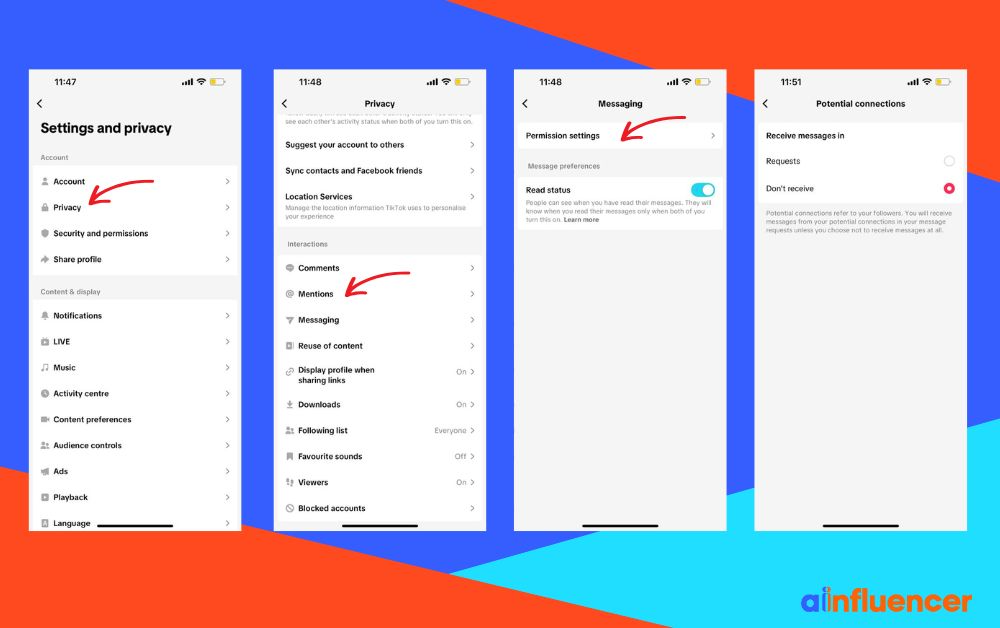
- Limit Who Can Share With You: Go to Settings & Privacy > Privacy > Direct Messages and set Permission Settings to receive messages. Fewer DMs = fewer Shared With You tags.
- Avoid Clicking External TikTok Links: Links from WhatsApp, Instagram, etc., can trigger the tag. Skip links from people you don’t want suggested.
- Manage Contacts: Turn off Contact Sync to reduce shared content pathways.
- Ignore or Mark “Not Interested”: Swiping past or tapping “Not Interested” tells TikTok to show it less.
- Block Persistent Sharers: If someone keeps popping up, blocking stops their content from showing.
- Let It Fade: Older “Shared With You” tags disappear over time as new content fills your feed.
How to Manage and Clear “Shared With You” Content on TikTok?
You don’t have to fully disable Shared With You to tidy up your feed. Here are some possible ways that might help you manage the content you see:
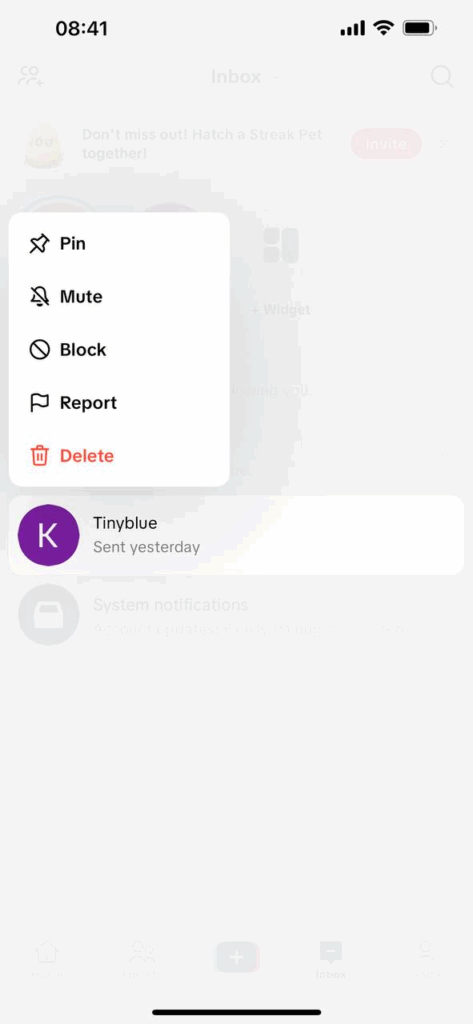
- Delete DM Threads: If a video is showing as “Shared With You” because of a chat, delete that conversation. Go to Inbox > Messages, long-press the chat, and choose Delete. This often removes those videos from showing up again.
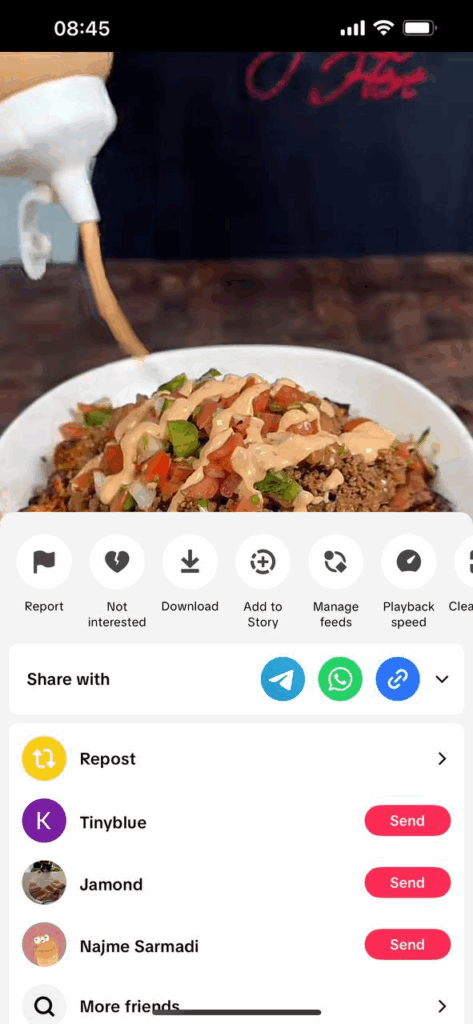
- Use “Not Interested”: Tap and hold a Shared With You video, then select Not Interested. TikTok will show fewer videos like it in the future.
- Mute or Unfollow the Sharer: If someone is sending too many videos, mute them in DMs or unfollow them. This reduces the chances that their shared content appears in your feed.
- Block as a Last Resort: Blocking someone on TikTok stops the person from sharing anything with you and removes their content from your feed entirely.
- Report Spam or Inappropriate Shares: If someone shares unwanted or spammy videos, reporting them can remove those items and alert TikTok moderators.
- Let It Fade: Your feed constantly updates. Older Shared With You videos naturally disappear as you watch new content.
- Clear Cache if Needed: If things seem stuck, clearing TikTok’s cache can refresh your feed (Settings > Clear Cache).
Is “Shared With You” Available for All TikTok Users?
The “Shared With You” tag is available to all users, but whether you notice it depends on your activity and who you interact with. TikTok started rolling it out in 2023, and by 2024, users around the world were spotting it.
As of 2025, it seems to be a standard part of TikTok for everyone, not limited to certain countries or accounts.
Wrapping Things Up
What does “Shared With You” mean on TikTok? Well, it’s TikTok’s way of showing that a video or profile got to your feed because someone shared it.
It could be from a friend sending a video in DMs, a link you clicked from outside the app, past interactions, mutual followers, or even algorithmic suggestions.
Although you can’t completely turn off the feature, you can manage it. Limit who can message you, mark videos as “Not Interested,” mute or unfollow certain accounts, or let older Shared With You content naturally fade as your feed updates.
What Does Shared With You Mean on TikTok: FAQs
The following questions break down the details and clarify common points of confusion:
1. What Does “Shared Videos With You” Mean on TikTok?
“Shared videos with you” is basically the same as “Shared With You.” It refers to videos that someone else sent you, either via a TikTok DM or an external link. TikTok labels them so you know these videos came from sharing, not just your own browsing.
2. What Does “Shared With You” Mean on TikTok Profile Views?
It doesn’t relate to profile views. Seeing “Shared With You” under a profile just means their content was shared with you, not that they viewed your profile.
3. What Does “Shared With You” Mean on TikTok Suggested Friends?
In suggested friends, it means TikTok is recommending someone because their content was shared with you before. It means that the person might be relevant to you.
4. What Does “Shared With You” Mean on TikTok, in Plain Terms?
Simply put, it means “this was shared with you by someone.” TikTok is reminding you that the content came through a share, not from your own browsing.
5. How to See “Shared With You” on TikTok?
You don’t need to look for a special tab; the tag just appears naturally in different parts of the app:
- On your For You Page (FYP) or Following tab, you may see “Shared with You” under the username.
- When you’re browsing profiles or suggested accounts, the tag can also show up under their name.
- Inside your Inbox (DMs), any TikToks friends send you may later reappear in your feed with the “Shared with You” label.