Wondering how to change your age on TikTok? You may have accidentally entered the wrong age when signing up, faced irregular regulations, or simply want to appear older or younger to an audience.
Age settings on TikTok don’t just affect what you can view—they can also influence your experience when sharing content. That’s why, alongside learning how to post on TikTok, it’s just as important to know how your listed age shapes what you can and can’t do on the platform.
If you’ve been stuck wondering why some things aren’t available to you, this guide is here for you. Let’s sort it.
How to Change Your Age on TikTok (Step-by-Step Guide)
Now that you know the importance of changing the age on your TikTok account, let’s take a look at the process to get it done. As the process does not change on Android and iPhone, we’ll be covering both in the same section.
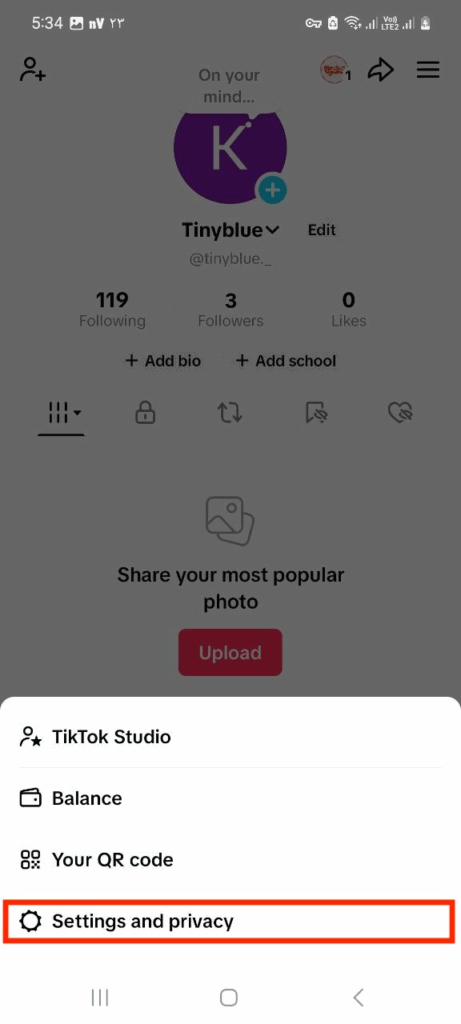
- Open TikTok and go to “Settings & Privacy,”
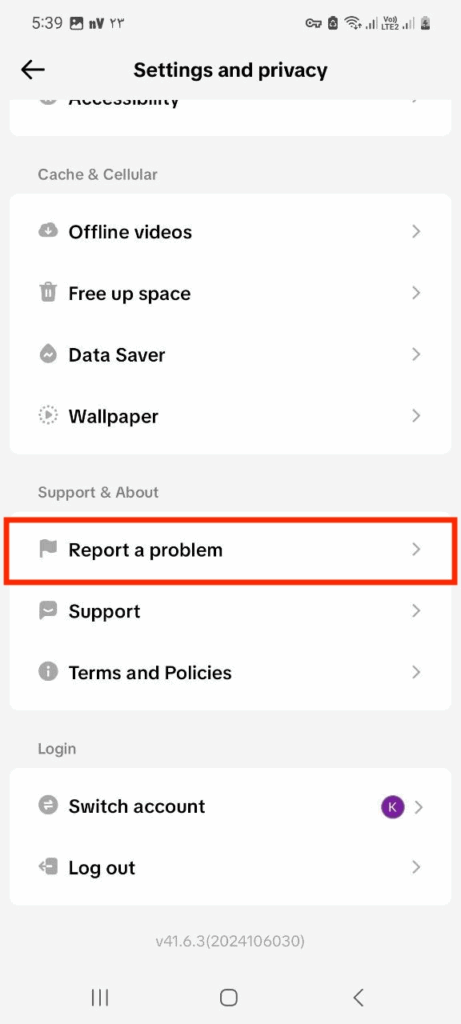
- Tap on the “Report a Problem,”
- Select the “Editing profile,”
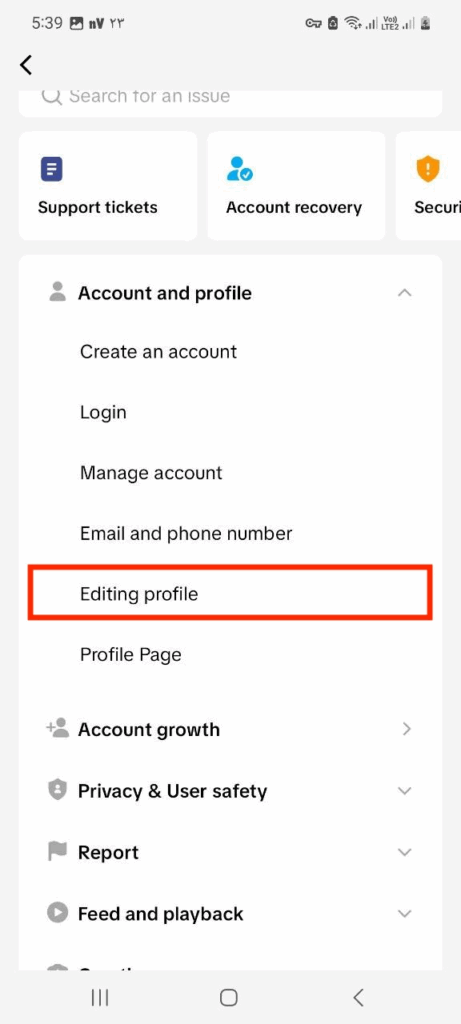
- Choose “Other” from this menu,
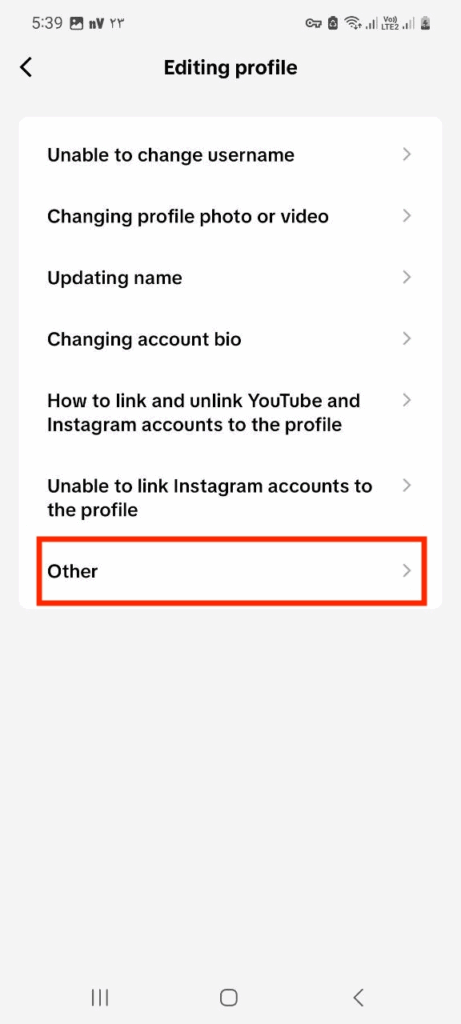
- Tap “Need more help?”
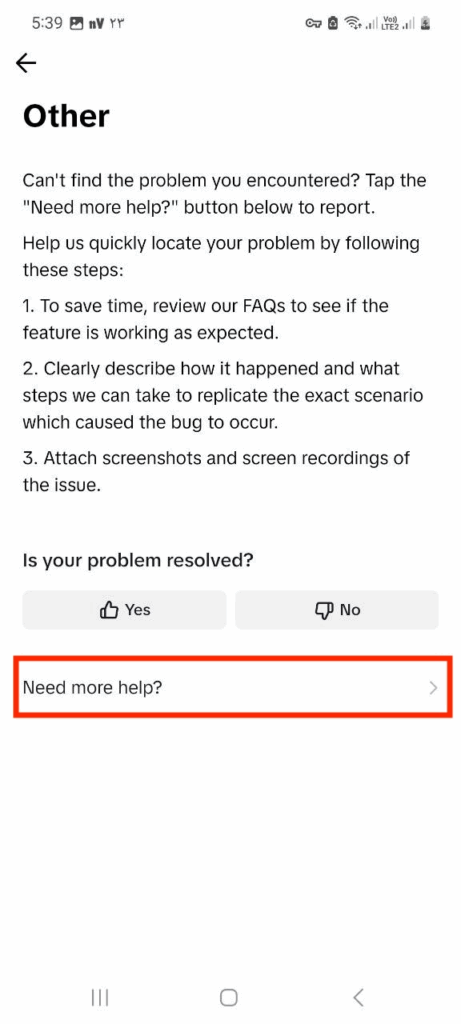
- Describe your request and submit,
- Wait for TikTok’s reply,
- Send your ID for verification.
That’s it. All you need to do now is sit back and wait for TikTok to respond to you. Remember that TikTok’s help center gets thousands of messages, and it might take a while for them to respond to you. So don’t rush it, and be as polite and kind as possible!
Why Change Your Age on TikTok?
If you’re unsure of why you may need to learn how to change your age on TikTok, we can prove its importance in this section of our article. One of the most common reasons for changing your age on TikTok is a simple sign-up mistake.
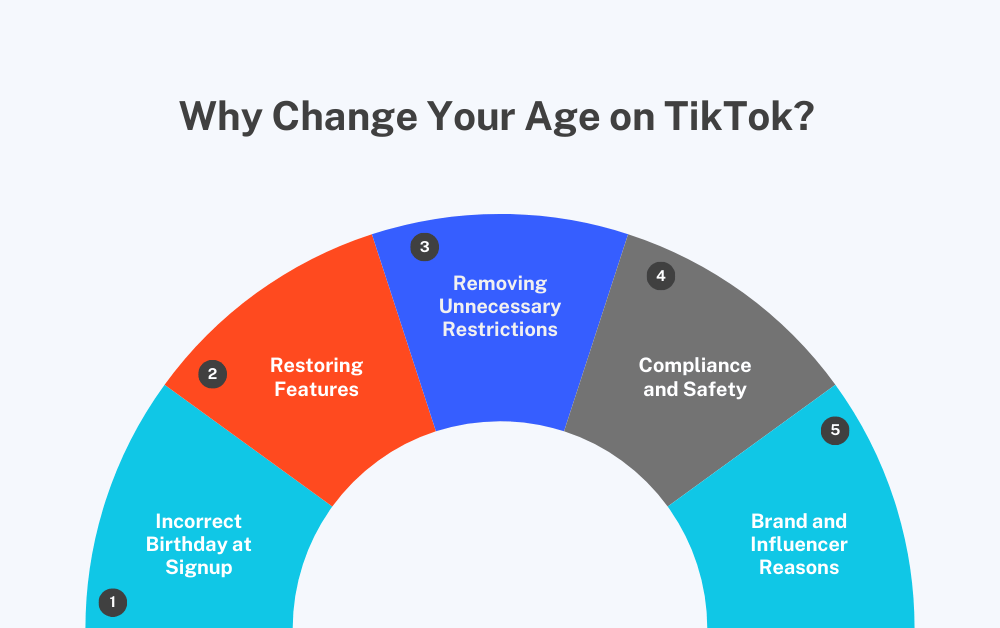
1. Incorrect Birthday at Signup
You may have accidentally scrolled too far on the year carousel when signing up, making you appear older or younger to the platform. This is the most common reason users intend to change their age on their TikTok profile.
Age is one of the factors that influences your “For you” page. So by entering the wrong age, you can be offered content that is intended for an audience older or younger than you.
This means you may end up with edits of Bluey on your algorithm as a 25-year-old! Tailoring the “For You” page is one of the main reasons to learn how to change your age on TikTok.
2. Restoring Features
An interesting method TikTok uses is its layered features system. Depending on how old you are, you can unlock different features on this platform. So if you’re 16+, you can livestream on TikTok and send direct messages, and 18+ can join TikTok’s creator fund.
An additional reason why changing your age settings on TikTok is a concern is being able to unlock its tiered features. You may also struggle to use TikTok Shop if you’re under 18. While the TikTok shop is safe, some regions have enforced age limitations for access to it.
Remember that these restrictions are set for a reason, so don’t try to trick TikTok into thinking you’re older. Keep things honest and make these changes when necessary.
3. Removing Unnecessary Restrictions
TikTok’s age restrictions don’t end with features. Occasionally, the platform restricts accounts under the age of 15. These restrictions include accounts being set to private, and no public sharing available.
The heavy restrictions for minors are set in place to ensure the safety of your children on TikTok. A platform as big as TikTok has no means to vet every new user, so it’s important to protect minors who may not be able to protect themselves.
4. Compliance and Safety
If your account is set under 13, there is a chance that TikTok might just delete your profile entirely. In order to avoid this, make sure your account is compliant with TikTok’s regulations. Being able to keep your account may include knowing how to change your age on TikTok.
5. Brand and Influencer Reasons
Much like getting more followers on TikTok, age accuracy also matters in monetization. In addition to being able to join the Creator Fund, you also need brands to have exact information about you. Sponsorships and product reviews heavily depend on how old you are, so make sure to keep this information updated and accurate.
Also Read: How Much Money Do You Get for 1 Million Views on TikTok
How to Change Your Age on TikTok: Top 3 Alternative Methods
If you followed the previous steps and still couldn’t change your age on TikTok, you can try these 3 alternative methods instead:
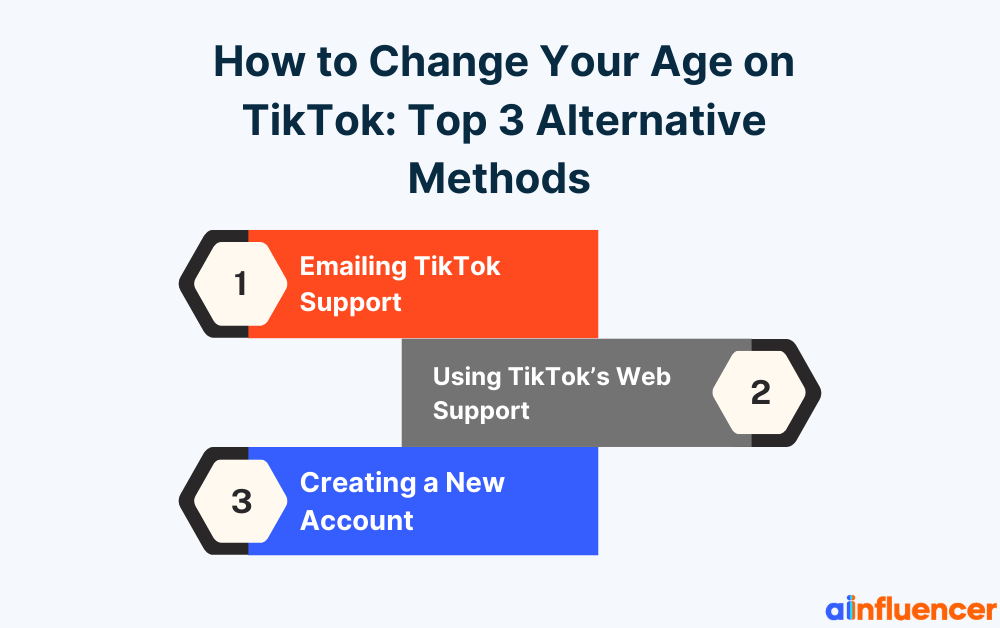
- Emailing TikTok Support: Our number 1 alternative solution is to email TikTok support. If too long has passed since your age change request was submitted, and you’ve received no response, you can email [email protected] to directly reach out to the platform.
- Using TikTok’s Web Support: On a computer, visit TikTok’s Help Center (support.tiktok.com) and look for “Report a Problem” or “Age” issues. You might fill out a web form or use live chat. This is similar to the app method, but done from a desktop. Some users find it easier to attach ID scans on a computer.
- Creating a New Account: If all else fails, you can start over and make a new account. Note that you will be losing all of your saves, followers, followings, history, and any other data that may be attached to your account.
We feel responsible to once again point out that these restrictions are important and necessary. Signing up on TikTok with a fake ID or lying about your age is against the platform’s policies, specifically TikTok’s child-safety laws, and is by no means endorsed by us.
Troubleshooting: Common Issues and Solutions
If you’ve learned how to change your age on TikTok but still struggle to get it done, you may be facing some common issues. So here are some problems people face when changing age on TikTok and how to fix them.
1. TikTok Support Isn’t Responding
You may be wondering how long is too long to wait. If it’s been more than a week with no feedback, you can assume that something has gone wrong. In that case, you can reach out to TikTok through other means.
You can use other email addresses, such as [email protected]. You can also contact them on @TikTokSupport on Twitter. If your message picks up traction, you will probably be noticed by TikTok itself.
2. Uploaded ID Not Accepted
Your ID photo needs some specific qualities to be accepted. These include being clear, well-lit, and fully legible.
The name on the ID must match your TikTok account name. If you have a different last name, due to marriage or using a nickname, it can fail.
In that case, include a short explanation to TikTok (in the email or another report form) that your profile name differs from your ID name.
3. Age Update Refused or Disapproved
TikTok may refuse if it suspects fraud or if the ID looks tampered with. There’s no point in trying fake IDs.
If you honestly meet the age requirement, you can calmly appeal again. Some users have had to resubmit multiple times. Each time, reply in a friendly manner, explaining exactly why you need the change.
4. Features Still Locked After Age Change
Sometimes you might update your birthday but find that some features, such as TikTok livestreams, still seem inaccessible.
In that case, log out of TikTok and log back in, or even delete and reinstall the app. Caching issues can delay the change from taking effect on your phone. Give it some time and try again later.
5. “Report a Problem” Missing or Disabled
In rare cases, the menu option might not be visible, most likely due to an out-of-date app version. Make sure your TikTok app is fully up to date in the App Store/Play Store.
You can also clear TikTok cache to be sure. If the option still doesn’t appear, try the web help center as mentioned above.
These are the most common issues users face when trying to change their age on TikTok. If there are any other issues, you may find it easiest to directly contact TikTok and ask them for help.
Conclusion
We hope to have answered your “How to change your age on TikTok” question and every other problem surrounding it.
So open your app now and check if everything is in order, and make sure to enter accurate and honest information.
FAQs
1. How to Change Your Birthday on TikTok?
To change your birthday on TikTok, you will need to contact the app and offer an official ID. Your national ID, passport, or driving license is the best option available.
Once TikTok reviews your documentation, your birthday and subsequently your age will change on the platform.
2. How to Change Your Age to 18 on TikTok?
The only way to change your age to 18 on TikTok is to be 18 years old. Since TikTok requires official identification to change your age, you have no option but to simply wait and grow up.
3. Why Does TikTok Want My ID to Change My Age?
This is for verification. TikTok needs to be sure you’re not lying to change your age. By law (COPPA and COPPA-like regulations), TikTok must verify ages when correcting mistakes.
Submitting a government ID shows that the change is legitimate. Rest assured, TikTok handles these IDs securely and only uses them for verification.
4. How Can I Remove the Age Restriction on TikTok?
There is no way to remove age restrictions on TikTok. The platform is adamant on ensuring the safety of younger users, and has yet to find a solution other than restricting minors.
5. How Do I Verify My Age on TikTok?
Verifying your age requires the same steps mentioned above.
- Open the TikTok app.
- Go to Profile → Menu → Settings and privacy.
- Scroll down to Report a problem.
- Select Editing profile → Other.
- Tap Need more help?.
- Write a short message and mention why your birthday is incorrect.
- Submit your request.