You’re scrolling TikTok and finding a video of your ex that’s so perfect to share with your best friend. You quickly take a screenshot, then suddenly wonder: “Does TikTok notify screenshots?” You’re not the only one who’s thought about that.
Maybe a TikTok story has a sweet poem or a quote you love. You may want to save it to use it later when posting on TikTok. Or perhaps it’s a picture you’d like to share in your friends’ group chat and talk about. But the question is: does TikTok send notifications for screenshots in any case? Let’s break it down.
Does TikTok Notify Screenshots? (The Summary)
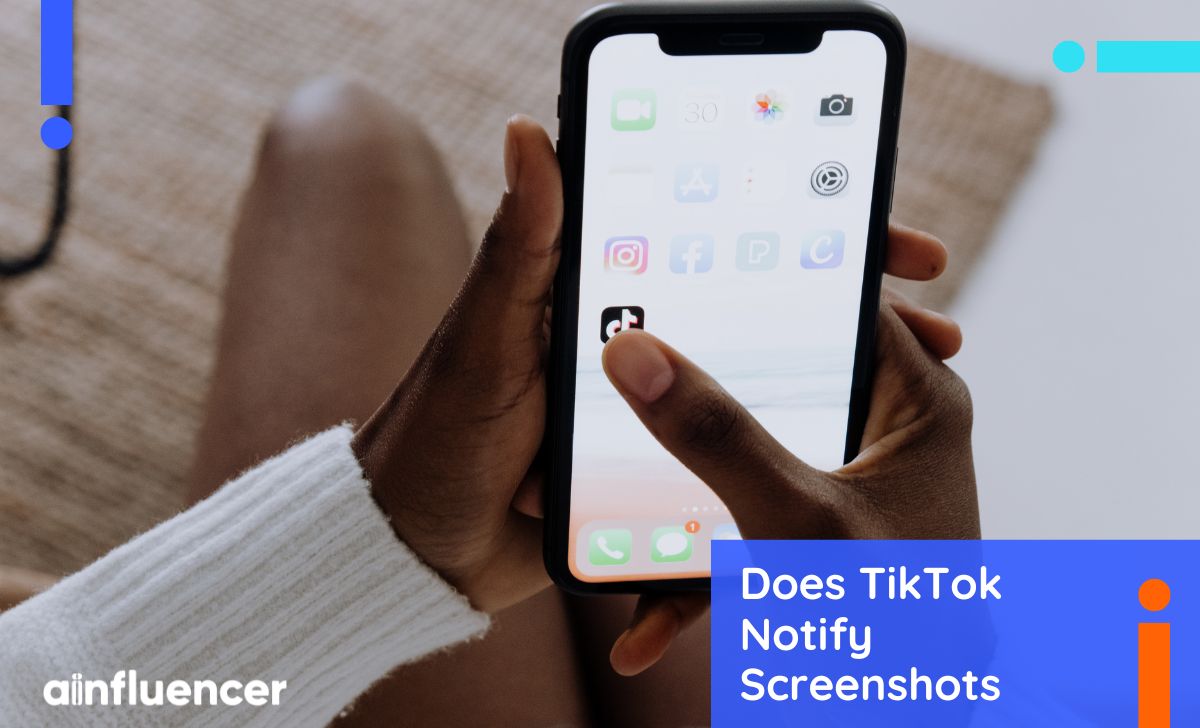
The quick answer: No, TikTok does not notify anyone when you take a screenshot. If you take a screenshot from a funny video on your For You Page, a friend’s story, or even a live stream on TikTok, the other person won’t get any notification. TikTok doesn’t show any icon, log, or sign that a screenshot was taken, because it stays completely private.
TikTok does not notify creators when someone records a video or takes a screenshot of their content. This rule applies across the app from videos, profiles, and direct messages to lives.
From a marketing view, this “silent screenshot” feature makes TikTok content easy to share, but it also means creators should know that anything they post could be saved without them knowing.
Now let’s look at each scenario in detail so you know exactly how it works.
Does TikTok Notify Screenshots of Videos?
No. If you screenshot a TikTok video or post, the creator won’t know. Many creators even ask fans to screenshot recipes, quotes, or coupon codes. Some users also repost on TikTok instead of screenshotting, since reposting keeps the content in-app. Either way, creators never get a notification.
Some creators even let you download videos directly using the “Save Video” option, which is easier and respects their content.
Does TikTok Notify Screenshots of Stories?
No, TikTok does not alert users if you screenshot a story. Even though stories vanish after 24 hours, screenshots stay permanent. For example, you could screenshot a poem or a friend’s dance routine to practice later, and they’d never know.
Since you never know who might screenshot your story, it’s a good idea to delete a story on TikTok early if it’s something you don’t want saved.
Does TikTok Notify Screenshots of DMs?
No. TikTok does not notify screenshots in private chats. You can capture messages, photos, or videos in DMs without the other person knowing. Still, respect privacy and don’t share personal chats without consent.
Does TikTok Notify Screenshots of Live Streams?
Screenshots during a TikTok Live stay completely private. Hosts and viewers won’t see any notification.
Does TikTok Notify Screenshots of Comments?
No. Comment threads can be screenshotted freely, without notifying the user. Whether it’s a username, bio, or a funny comment, you can save it privately.
Does TikTok Notify Profile Screenshots?
No, TikTok does not notify users when someone screenshots or screen records their profile. The only exception is ‘Profile View History’: if it’s turned on, the user might see that you visited their profile, but they won’t know you recorded it.
Does TikTok Notify When You Screen Record?
Let’s get straight to it: No, TikTok does not notify anyone when you screen record a video, live stream, profile, or chat. Screen recording works just like taking a screenshot. It captures what’s on your screen, and TikTok doesn’t alert the creator.
Can You Prevent Screenshots on TikTok?
Unfortunately, the answer is no. If someone can see your video or photo, they can screenshot or screen-record it.
There’s no technical lock for this. Even videos without a download button can still be captured manually.
First, you can make your account private to control who follows you, but your approved followers can still screenshot your videos.
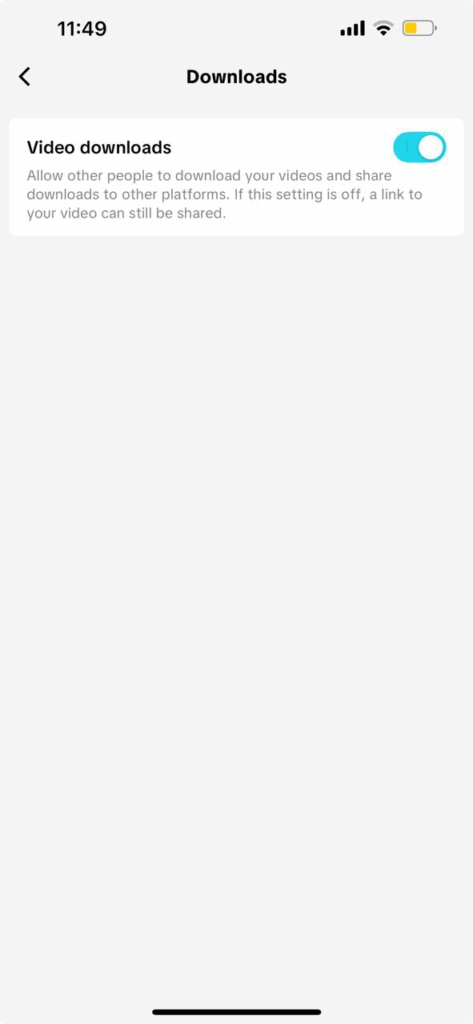
Second, don’t let people download your TikTok videos. If you want to turn off downloads in your settings, take the following simple steps:
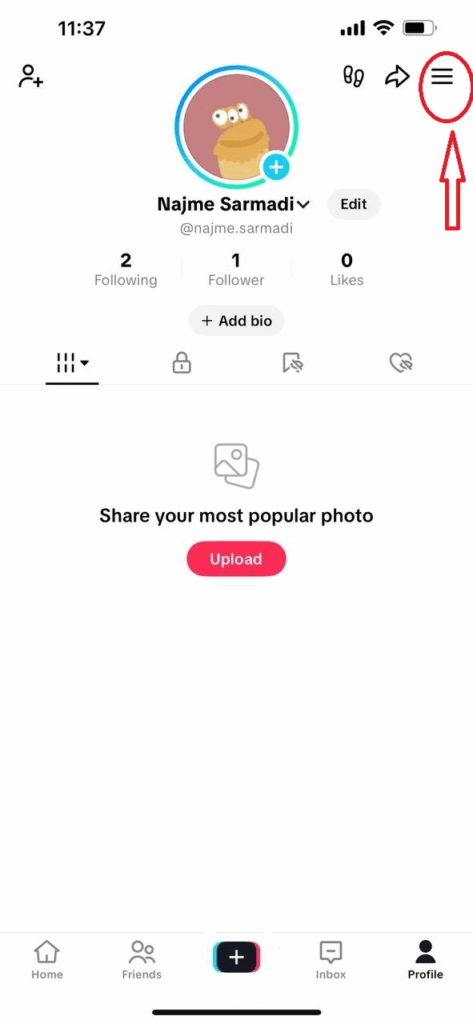
- Open the TikTok app and go to your ‘Profile’ and tap the three-line icon in the top right corner.
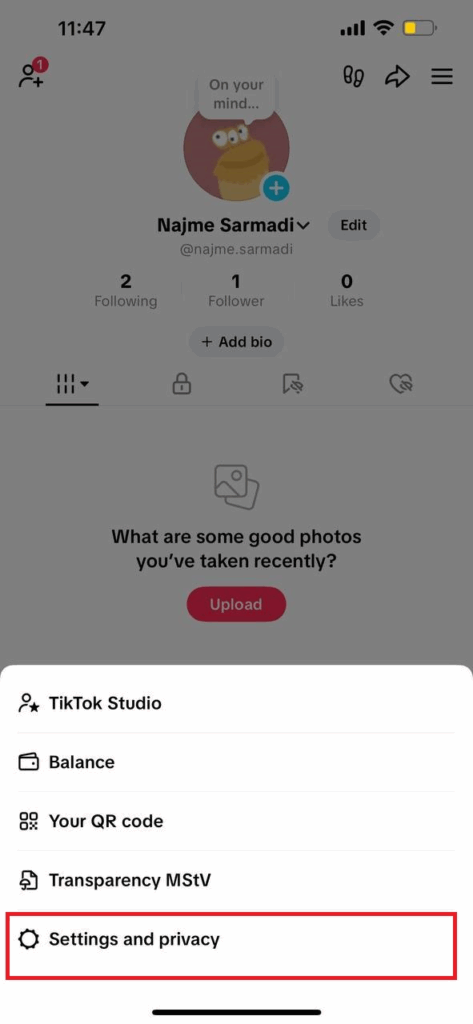
- Select Settings and Privacy.
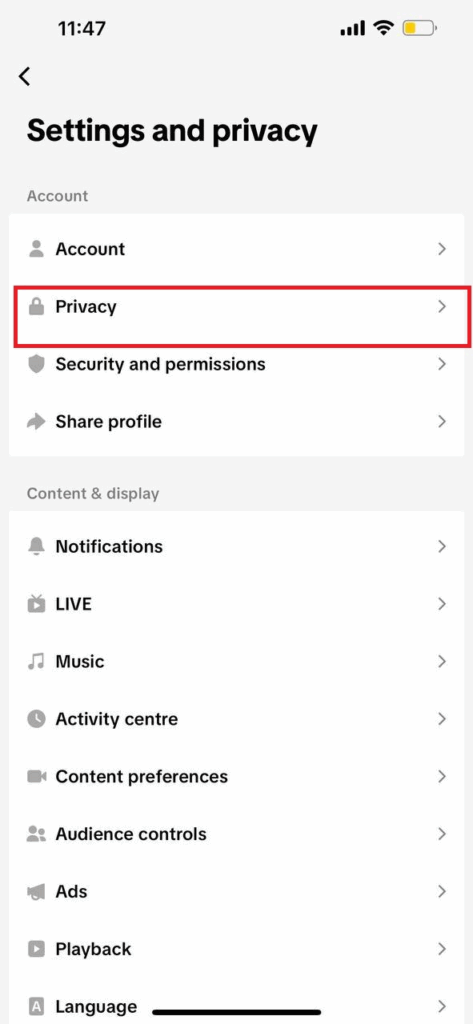
- Go to Privacy.
- Then Select Downloads.
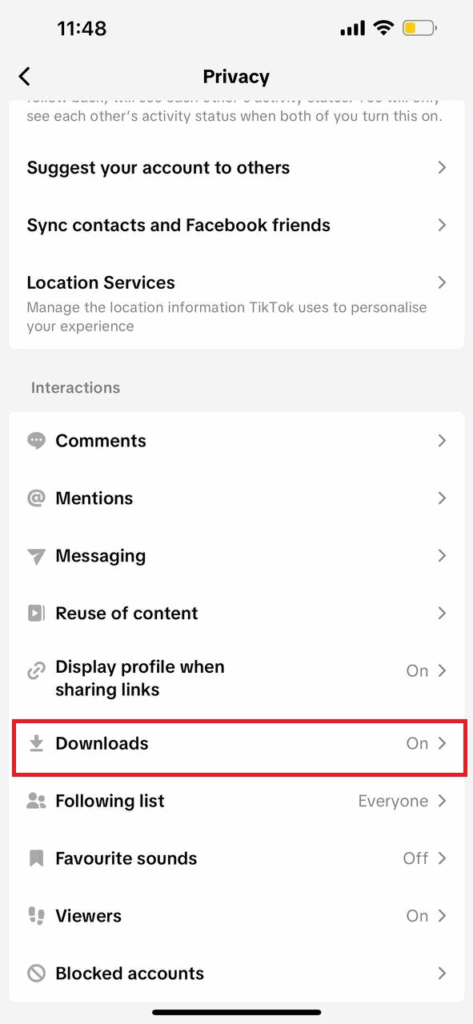
- In video downloads, you just toggle the option off (or back on if you want).
Other Ways to Limit Sharing of Your TikTok Videos
To reduce unwanted downloads or sharing, try these steps:
- Limit Video Visibility: When you post, set each video to Public, Friends, or Only Me. Sharing with Friends-only helps keep your content within a smaller circle.
- Add Watermarks or Logos: Place your username or logo on videos so even screenshots carry your handle.If you don’t have a logo yet, you can use a free logo design tool to create a simple branded logo for your TikTok content.
- Control Comments and DMs: Filter comments and restrict messages to avoid sharing private info that could be screenshotted.
- Block or Report Misusers: You can block someone on TikTok if they misuse your content. You can also report copyright/harassment violations.
TikTok’s Screenshot Policies: Why TikTok Doesn’t Notify Screenshots?
You might wonder why TikTok doesn’t alert users when someone takes a screenshot. Unlike Snapchat or Instagram, TikTok works differently. Here’s why:
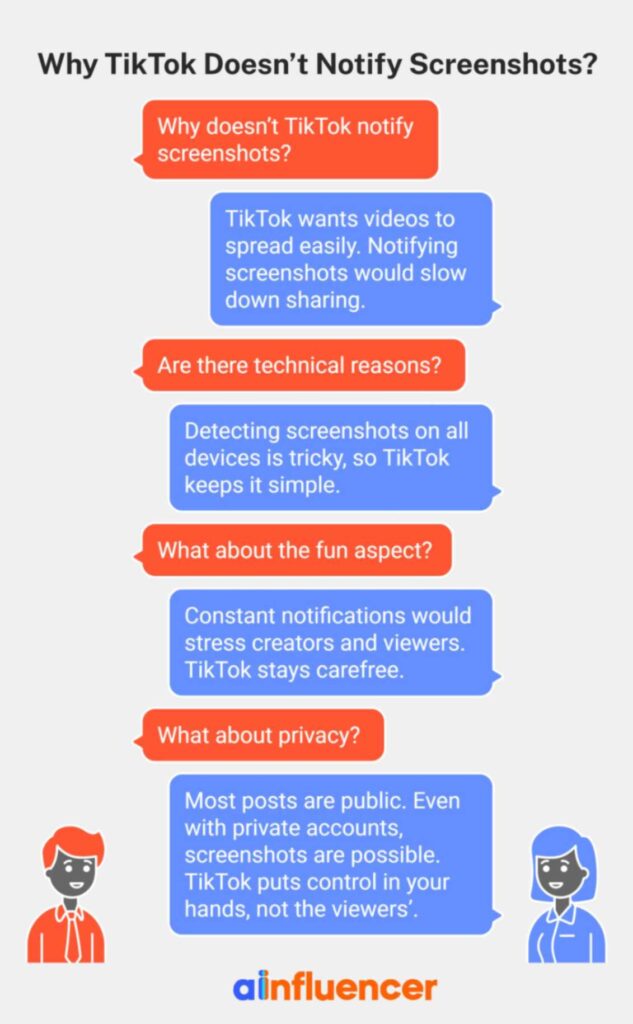
- Sharing and Going Viral: TikTok wants videos to spread easily. Not notifying screenshots makes it simple for users to save and share content, like memes or funny clips, without slowing things down.
- Technical Reasons: Detecting screenshots on all devices is tricky, so TikTok keeps it simple.
- Keep It Fun: Constant notifications would stress creators and viewers. TikTok stays carefree, letting everyone enjoy content.
- Privacy: Most posts are public. Even with private accounts, screenshots are possible. TikTok puts control in your hands, not the viewers’.
Comparison of TikTok Screenshot Policy with Other Platforms
Wondering how TikTok compares to other apps when it comes to screenshots? Here’s a quick look:
- Snapchat: Snapchat always notifies screenshots because the content is private and temporary.
- Instagram: It doesn’t notify users when you screenshot public posts or Stories. But what about disappearing photos in DMs? Yes, Instagram does send a notification.
- Facebook, Twitter, LinkedIn, Pinterest: Usually, no screenshot alerts, just like TikTok.
How to Save TikTok Videos Without Screenshots?
If you want to save TikTok videos without taking screenshots, here are some easy ways:
1. Use Favorites Feature
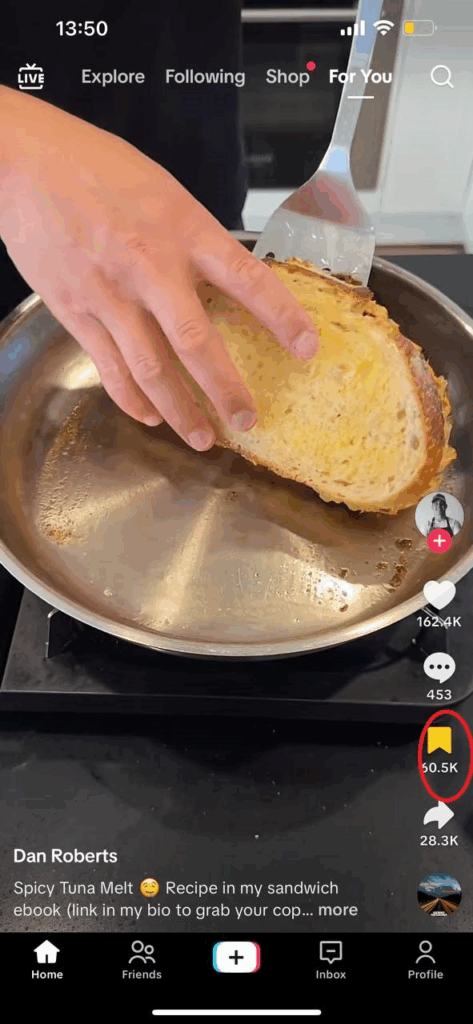
Tap the little bookmark icon on a video to save it to your Favorites. You can find all your saved videos on your profile. It’s quick, organized, and doesn’t use extra storage.
2. Download Videos
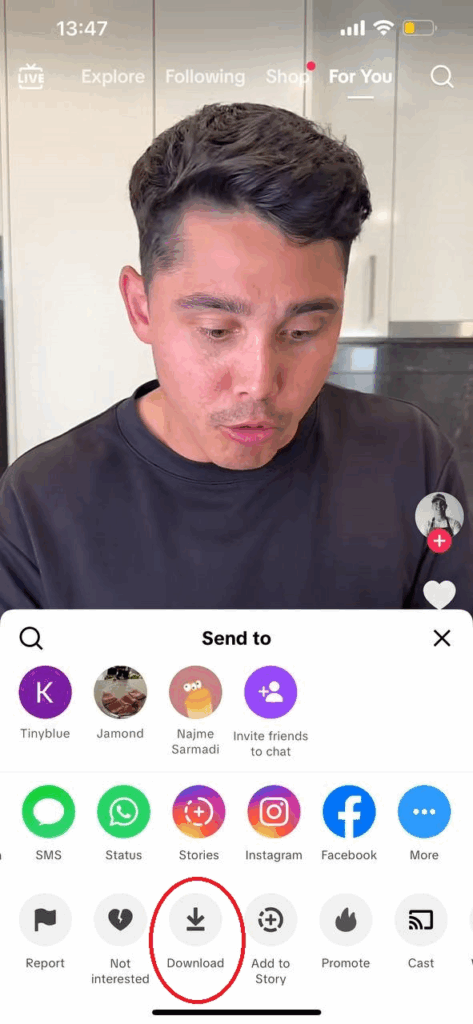
Some creators allow you to download their videos. Just tap Share → Download Video, and it goes straight to your phone. If downloads aren’t allowed, you can try another method instead.
3. Screen Recording
If downloading isn’t an option, you can record your screen:
- iPhone: Use the screen recorder from the Control Center.
- Android: Use the built-in recorder or a third-party app such as XRecorder. This can use storage and may lower video quality a bit.
4. Use Another Device
You can also record or snap a video with another phone or camera. It works well for short clips, but keep it steady, and for personal use only.
Wrapping Things Up
If you’ve been wondering, “Does TikTok notify screenshots?” the answer is simple: it doesn’t. Whether you’re saving a video, a story, a DM, or even a Live, the creator won’t get a notification. Screen recording works the same way; it stays private and invisible.
FAQs
1. Can I Find Out If Someone Screenshotted My TikTok Content?
No, TikTok doesn’t provide any way to see who took screenshots. There’s no notification or log. Sometimes followers might tell you (“I saw your video shared as a screenshot”), but the app itself won’t.
2. Do I Get Notified If Someone Reposts My TikTok?
No, TikTok doesn’t send notifications when your content is reposted. If someone reposts your video on TikTok, you won’t know directly.
3. Will TikTok Introduce Screenshot Notifications in the Future?
There’s no official word from TikTok yet. Some experts think they might add it for stories or DMs if privacy concerns grow. But for now, assume screenshots stay silent.