
Have you ever posted something on TikTok by mistake? It happens to all of us! That’s why it’s good to know how to delete a TikTok story. Maybe you picked the wrong video, made a small mistake, or just changed your mind. Deleting a story is quick and easy.
Deleting TikTok stories is just as important as posting on TikTok. Mastering both lets you stay in control of what shows on your profile. So, you can post with confidence and remove anything you don’t want to keep.
How to Delete a TikTok Story? (Step-by-Step)
The good news is that deleting your story on TikTok is so easy and works the same way on both iPhone and Android. Here’s exactly how to delete a story on TikTok:
Method 1: Delete Directly from Your Story
According to TikTok’s stories support page, the quick way to delete a TikTok story is from your profile. Here’s how:
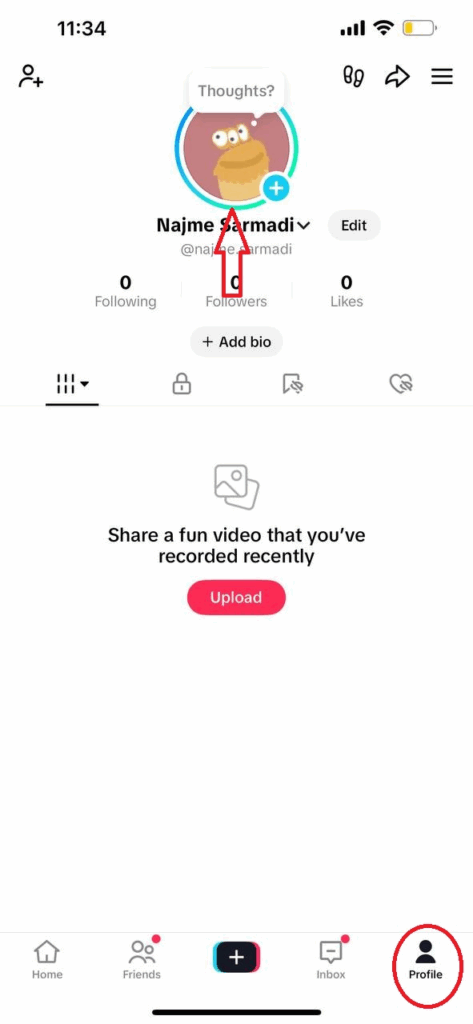
- Open your profile: Tap the “Profile” icon at the bottom right of the app.
- Tap your profile picture: At the top of your profile page, tap your circular profile photo. This opens your active story.
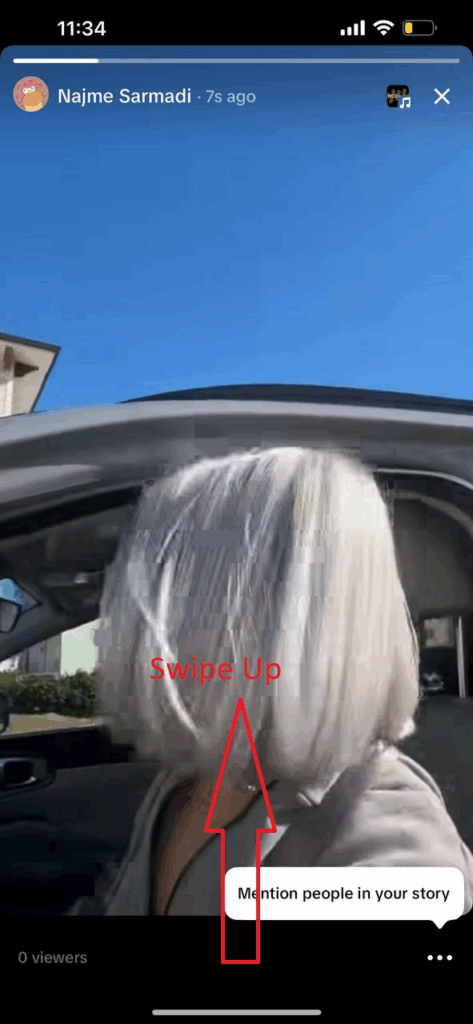
- Swipe up on the Story: A menu will appear showing who has viewed your story.
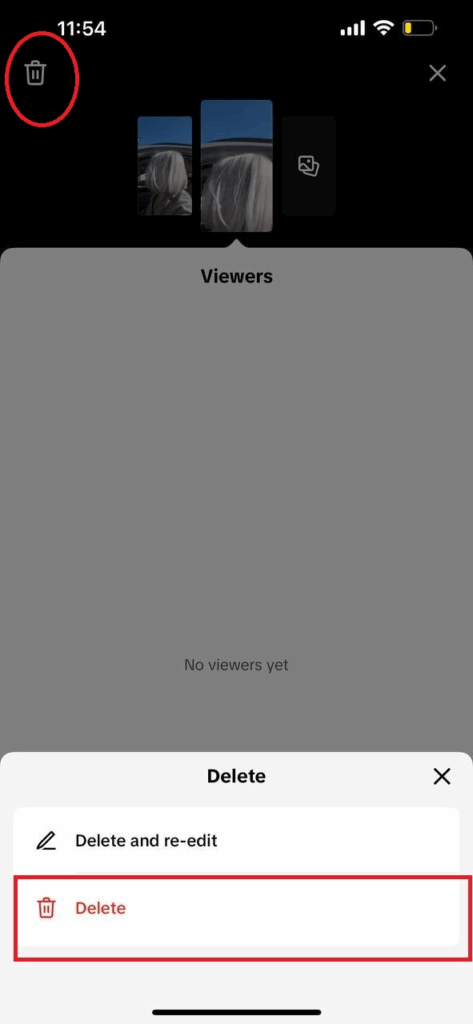
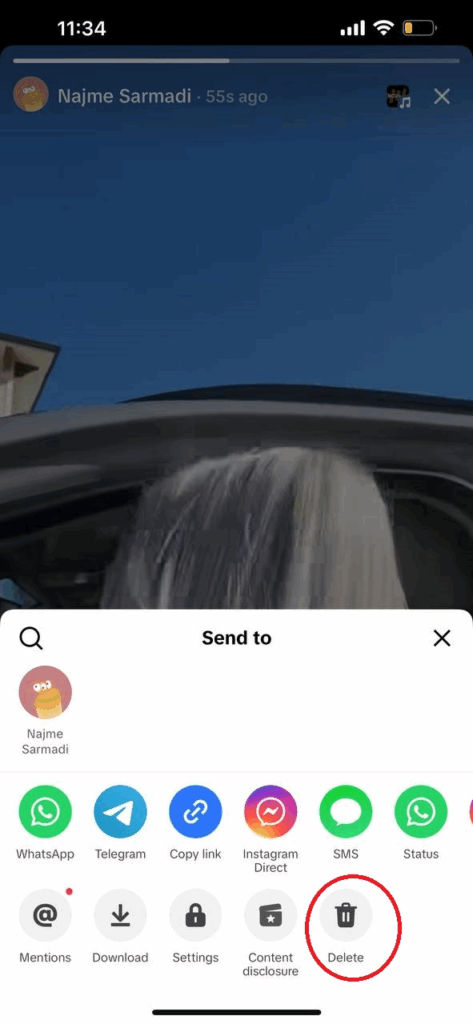
- Tap Delete and confirm: You’ll also see a trash can (Delete) icon in the corner. Tap the trash can, then confirm by tapping “Delete” again. TikTok will remove the story right away.
Method 2: Use the Share Menu
If swiping up feels confusing, there’s another way to delete your story on TikTok:
- Open your story.
- Tap the three dots (•••) (or Share arrow icon) at the bottom of the screen.
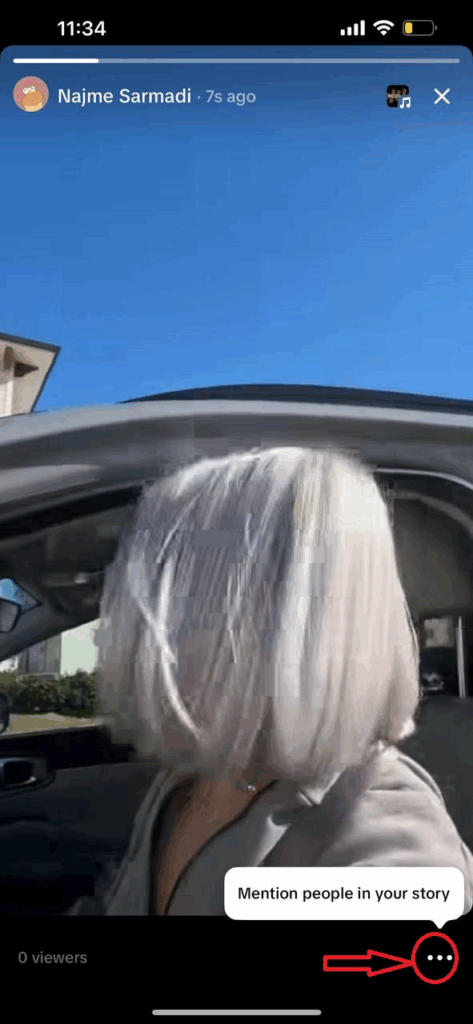
- From the menu that appears, choose Delete and confirm.
Method 3: Delete and Re-edit
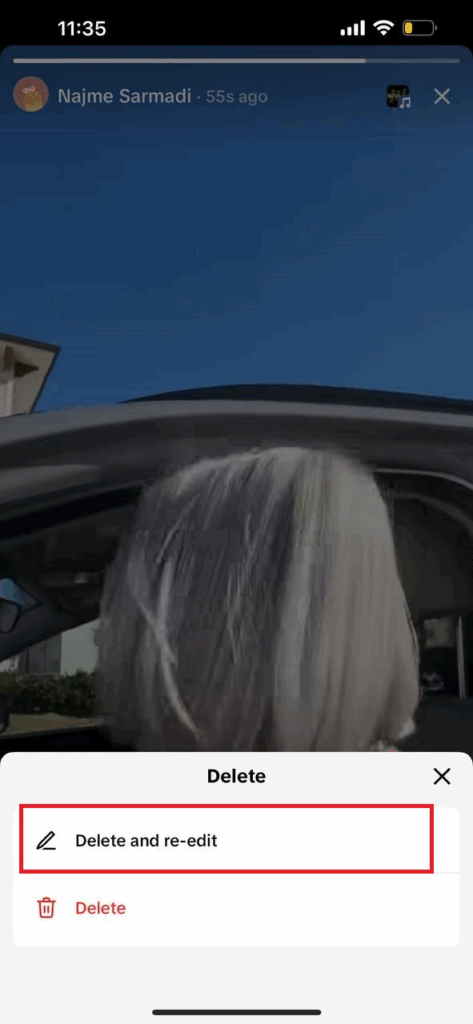
TikTok also has a handy feature called Delete and Re-edit. This is perfect if you only made a small mistake (like a misspelled word or wrong sticker).
When you choose this option, TikTok removes the story but reopens it in the editing screen so you can quickly fix and repost the story without starting over.
What Happens After You Delete a TikTok Story?
Now, you tapped delete, but what happens next? Well, your story disappears from your profile, your followers’ feeds, and no one can view it anymore. Here’s what you can expect after deleting your TikTok story:
- Instant removal: The story is deleted right away. If someone tries to tap your profile picture after you remove it, they’ll just see no story.
- No notifications: TikTok doesn’t tell your followers when you delete a story. It simply vanishes, and most people just assume it expired.
- Likes, comments, and views disappear: Any engagement tied to that story is erased once it’s deleted. You also lose access to the viewer list and analytics.
- No recovery option: Unlike Instagram, TikTok doesn’t have a “Recently Deleted” folder for stories. It’s permanently gone.
- No penalty: Deleting a story early won’t hurt your account or reach. TikTok treats stories as temporary anyway.
- From followers’ side: They’ll just notice the story is gone, but most won’t think twice about it.
- Be mindful of screenshots: While deletion removes the story from TikTok, it doesn’t erase screenshots or screen recordings someone might have taken. TikTok doesn’t notify you about those.
Also Read: What Does Shared With You Mean on TikTok
Troubleshooting: Why Can’t I Delete My TikTok Story?
Deleting a TikTok story is usually easy, but sometimes things don’t go as planned. Here are common problems and how to fix them.
1. Why Don’t I See a Delete Button?
If the trash icon or delete option isn’t showing, your app might be outdated. Older versions of TikTok had a three-dots (•••) menu for deleting stories. Tap the three dots, select Delete, and confirm.
To avoid confusion, make sure your TikTok app is updated, and then the swipe-up delete method should work perfectly.
2. My Story Is Stuck Uploading, How Can I Stop It?
If a story starts uploading and you want to cancel it, quickly turn on Airplane Mode or turn off Wi-Fi/data. This stops the upload. Check your drafts folder afterward; if the story didn’t post, you can delete it from drafts. If it has already gone live, delete it normally. Acting fast is key!
3. I Deleted a Story, But Some Users Still See It, Why?
Usually, deletion is instant. But some followers might see it briefly due to caching. Ask them to refresh or reopen TikTok. Also, make sure you confirm deletion when prompted. If the story ring disappears from your profile, it’s successfully deleted.
4. Why Isn’t My Story Deleting?
If tapping Delete doesn’t work, check your internet connection. Try again with a stable connection. You can also clear TikTok’s cache or log out and back in. Usually, the story will be deleted after these steps.
Privacy Settings for TikTok Stories
Managing who sees your TikTok story is just as important as knowing how to delete it. Sharing strategically with the right audience can increase your TikTok engagement.
It also helps you get more followers on TikTok. Moreover, adjusting privacy can prevent the need to remove a story later.
#1 Choosing Who Can View Your Story
You can set a story’s audience when posting or after:
- Everyone: Public, anyone can see it.
- Friends: Only mutual followers see it.
- Only Me: Private, only you can see it.
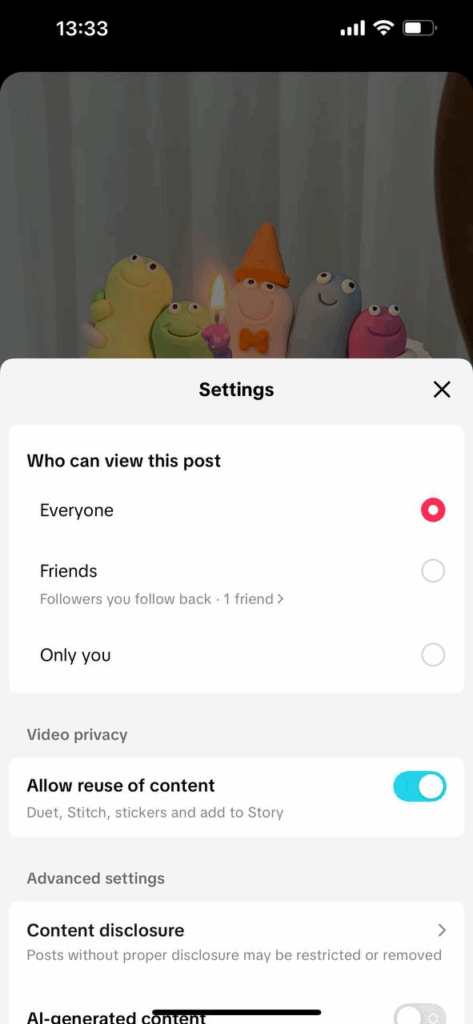
For private accounts, options are Followers, Friends, or Only Me. Change a posted story by tapping it → Share → Settings. You can also block someone on TikTok to stop them from viewing your posts and stories.
#2 Direct Message Replies to Stories
Viewers can reply via DMs. Control this under Privacy > Direct Messages:
- Everyone: Anyone can reply.
- Friends: Only friends can reply.
- No one: Disable replies completely.
#3 Review Your Followers (for Private Accounts)
Remove or block followers you don’t trust to limit who sees your stories. Only approved followers will have access.
#4 Going Private (for a While)
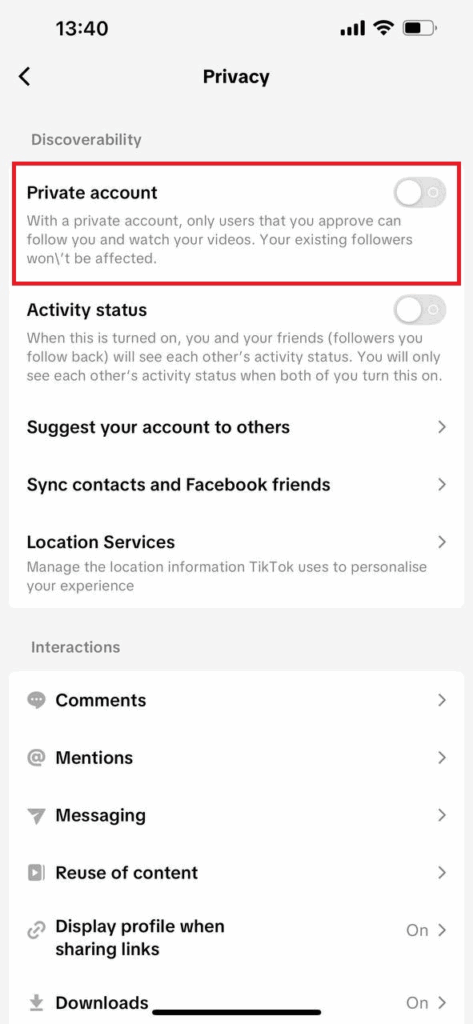
Set your account to Private temporarily to restrict new viewers until stories expire. After 24 hours, switch back if needed.
#5 Limit Story Sharing
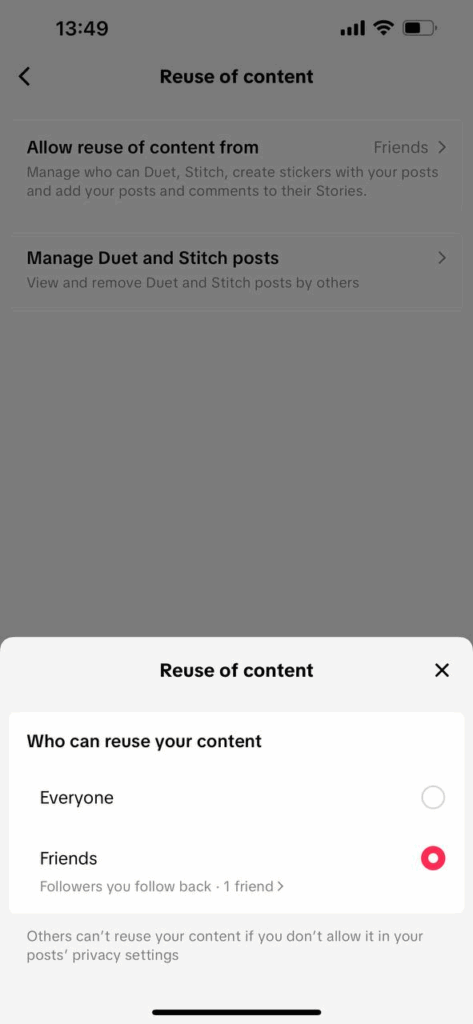
TikTok doesn’t allow others to repost your story, but you can prevent them from adding your posts to their stories in Privacy settings > Reuse of Content.
Wrapping Things Up
Deleting a TikTok story is a simple yet powerful way to manage your content and keep your profile looking the way you want.
Mistakes happen, opinions change, or sometimes you just want to tidy up your feed. Knowing how to delete a TikTok story ensures your account reflects what you want to share.
FAQs
1. How Do I Delete a TikTok Story Before It Expires?
It’s easy! Go to your profile, open the story, swipe up (or tap the share arrow), and tap Delete, then confirm. Your story will be removed immediately, even if the 24 hours aren’t up. If you post something by mistake, you can delete it right away, and no one will see it.
2. Does TikTok Notify Others When I Delete a Story?
No, TikTok doesn’t notify anyone. Deleting a story is completely silent. Your followers won’t get an alert, and most won’t notice unless they were actively watching. It just disappears quietly from everyone’s feed.
3. Can I Recover a Deleted TikTok Story?
Unfortunately, no. Once a story is deleted, it’s gone for good. TikTok doesn’t offer a “Recently Deleted” option for stories. The only way to keep it is to save it to your device or post it privately before deletion, then re-upload if needed. Always double-check before deleting!
4. Can I Hide a Story from Specific People?
TikTok doesn’t let you hide stories from individual users, but you have options:
- Set Story to Friends Only: Only mutual followers can see it.
- Switch to Private Account: Only approved followers can view your content.
- Block someone on TikTok: Blocking a user stops them from seeing your posts and stories completely.
5. How to Delete a TikTok Story on an iPhone?
Deleting a TikTok story on an iPhone works exactly the same as on Android. Just follow the steps mentioned earlier: open your profile, tap your story, swipe up (or tap the share icon), and select Delete. Your story will disappear immediately from your profile and your followers’ feeds.
6. How to Delete a TikTok Story Before Posting?
If you haven’t posted the story yet, you can also delete it before it goes live by tapping Discard or Delete in the editing screen. This is especially helpful if you made a mistake, changed your mind, or just want to tidy up your content.