With privacy concerns growing on the platform, questions like how to hide followers on Instagram are getting more important every day. Users find themselves anxious about how much information they’re sharing online, and how much they could be hiding instead.
The good news is that while Instagram doesn’t have a one-click option to hide followers, there are a few simple tricks you can use to keep things a little more private. And just like you think carefully about what you post on Instagram, it’s worth taking a few minutes to adjust your settings so your account feels safer and more secure.
In this guide, we’ll break down the easiest ways to protect your privacy and take control of your follower list.
Can You Hide Instagram Followers?
In short, no. While you can take actions that also make your Instagram followers hidden, there is no way to solely hide Instagram followers. The platform simply does not include a feature for this.
So what can you do instead? There are a few steps that you can take to hide your Instagram followers. However, each of them includes certain drawbacks. Let’s explore these steps together.
How to Hide Followers on Instagram
We’ve seen why hiding followers is important, so now it’s time to learn how to keep your Instagram followers private.
While there isn’t an option to only hide followers, there are some workarounds that keep your followers hidden. This mostly changes based on privacy settings on Instagram. Let’s take a look at some of your options.
1. Make Your Account Private
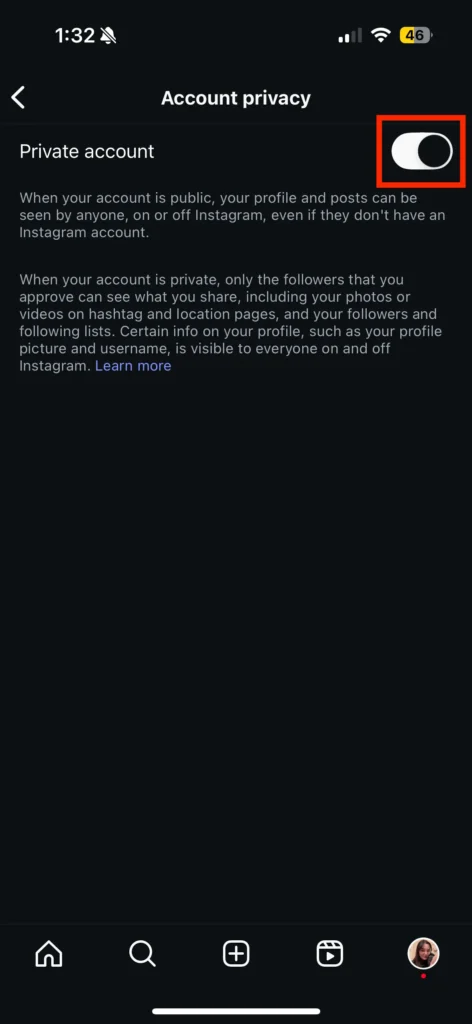
Since hiding followers on IG is not possible, your best option is to make your account private. A private account means only your approved followers can see your content. The drawback is that private accounts don’t just hide followers, they also hide your posts and stories.
When you turn your account from public to private, there are a few base elements that change:
No one can view your page without your approval. If users want to see your posts, they need to send you a follow request and wait for you to accept it.
So all of your photos, videos, stories, followers, and followings will be hidden. The only information that will be available to non-followers is the number of your posts, followers, and followings.
With that in mind, to turn your account private, you have to:
- Log in to Instagram and go to your profile,
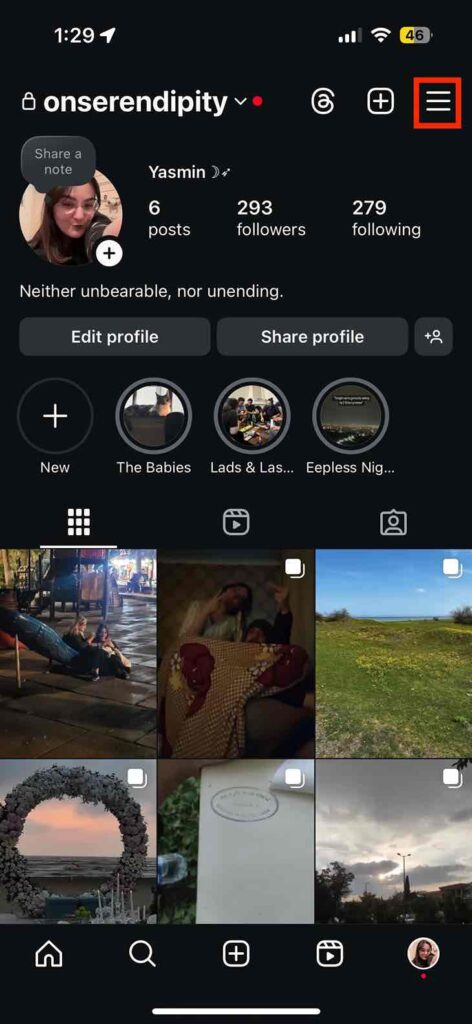
- Tap the hamburger menu for settings,
- Scroll down to find “Account privacy”,
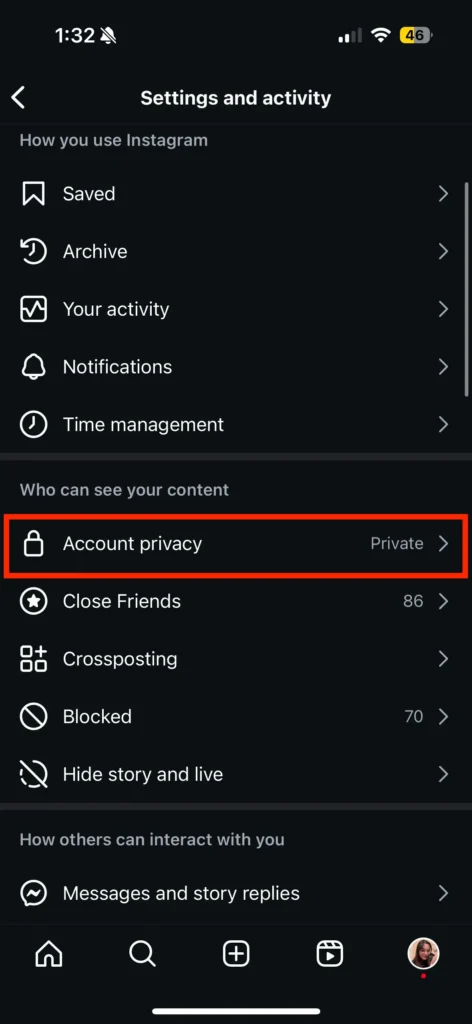
- Switch your account to private.
2. Restrict Followers
If you’re trying to hide your followers from a specific user, then you can use the restrict option.
Restricting someone on Instagram can basically limit their access to your information. A restricted user remains on your follower list, but they cannot see your follower list.
Additionally, they cannot comment publicly on your posts without approval, and their story views won’t show up.
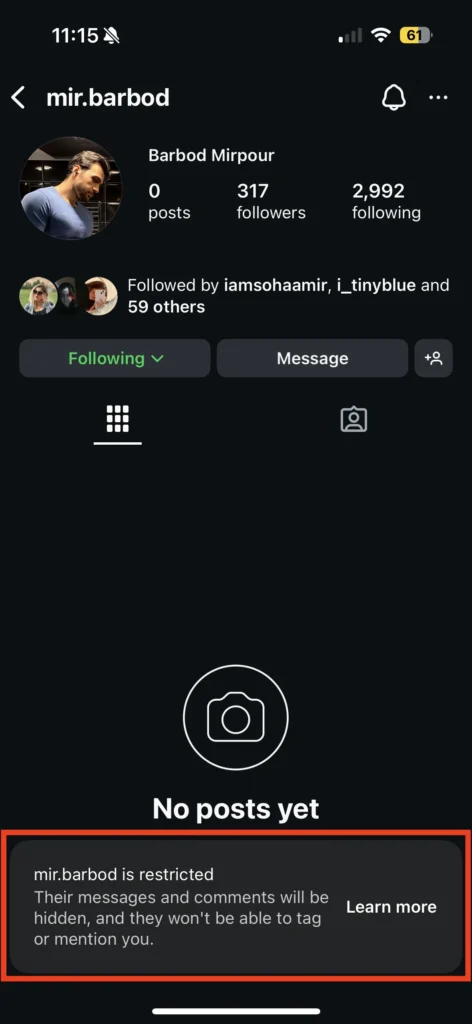
What changes when you restrict someone include:
- Restricted users still remain in your followers list.
- They can no longer tag or mention you, view your followers or followings, or comment and message you.
The restricted will not be notified that this is happening. In fact, to them, it looks like their comments and messages are still being delivered. But they will stay hidden from you and others.
To restrict an Instagram follower, you can:
- Open the Instagram app and go to your profile
- Tap the “Followers.”
- Find the follower to limit, tap the three dots by their name,
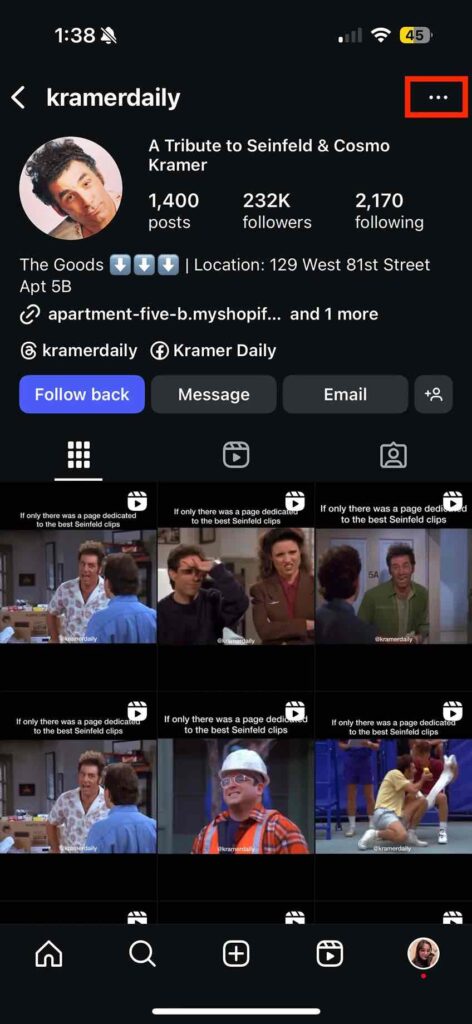
- Select “Restrict.”
3. Block Users
If even restricting users doesn’t offer you peace of mind, then blocking them might! When you block someone, they cannot find your profile, see any of your content, or view your followers/following lists at all. To sum it up, you do not exist to that specific user!
Blocking someone on Instagram will:
- Delete them from your followers and followings list,
- Limit all of their interactions with your account,
- Completely hide your profile from them.
If you choose to, Instagram will also automatically block any new accounts made with the same phone number.
This is done to protect users from online abuse. Unlike being restricted, knowing if you’re blocked on Instagram isn’t particularly challenging.
To block Instagram users, you can:
- Go to the person’s profile you want to block.
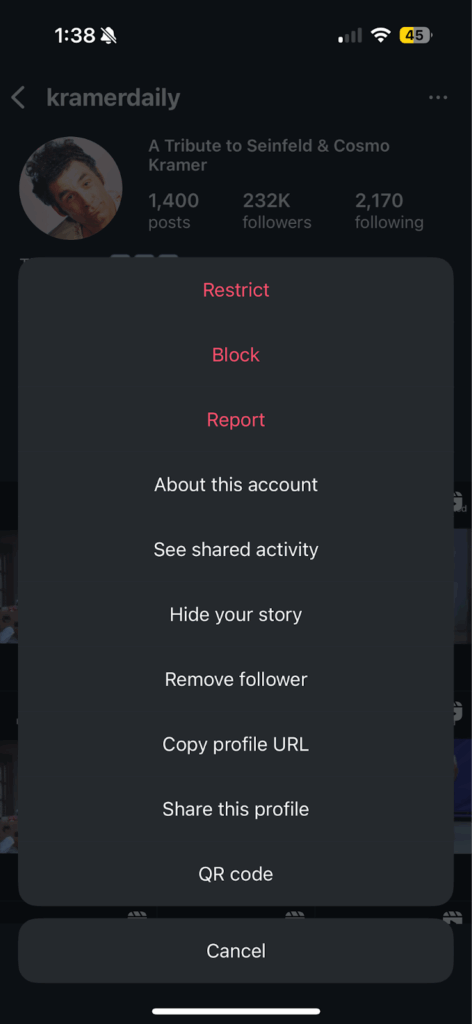
- Tap the three dots in the top right corner,
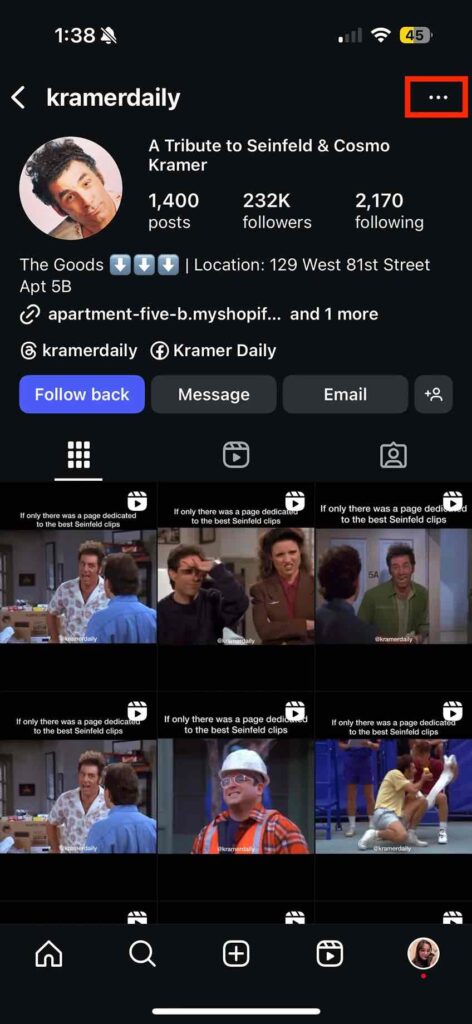
- Select Block.
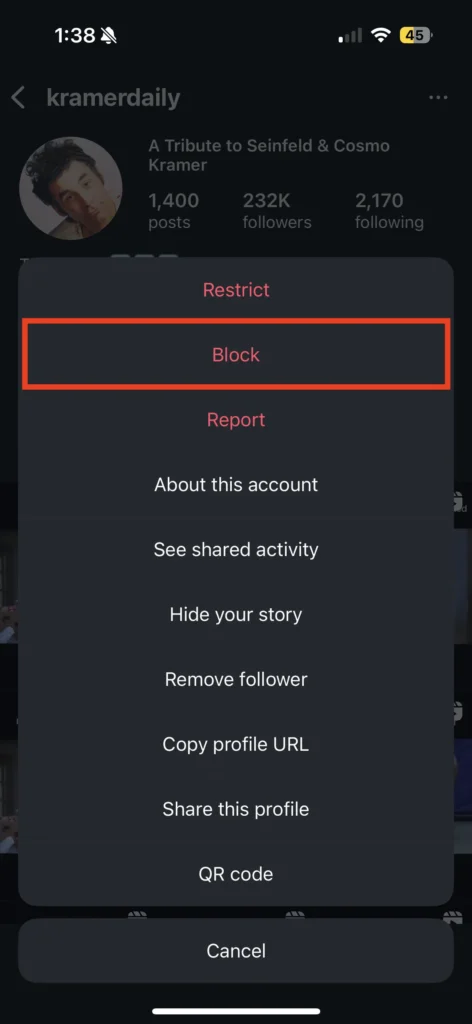
- Confirm the block.
4. Remove Followers on Instagram
If you want a middle ground between blocking and restricting someone, then removing followers may be the right answer.
Once you remove someone from followers, they will:
- No longer be in your followers list,
- Have no access to your content (if it’s a private account,)
Note that when you remove someone from your followers, they will be able to follow you again. This is not the case when blocking users.
To remove an Instagram follower, you can:
- Find the follower you want to remove,
- Tap the three dots on the top right corner,
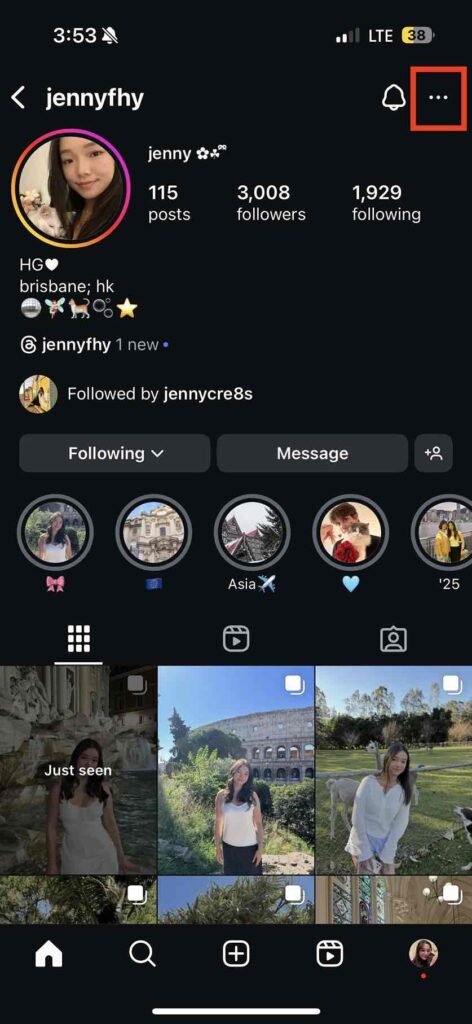
- Tap the “Remove follower”.
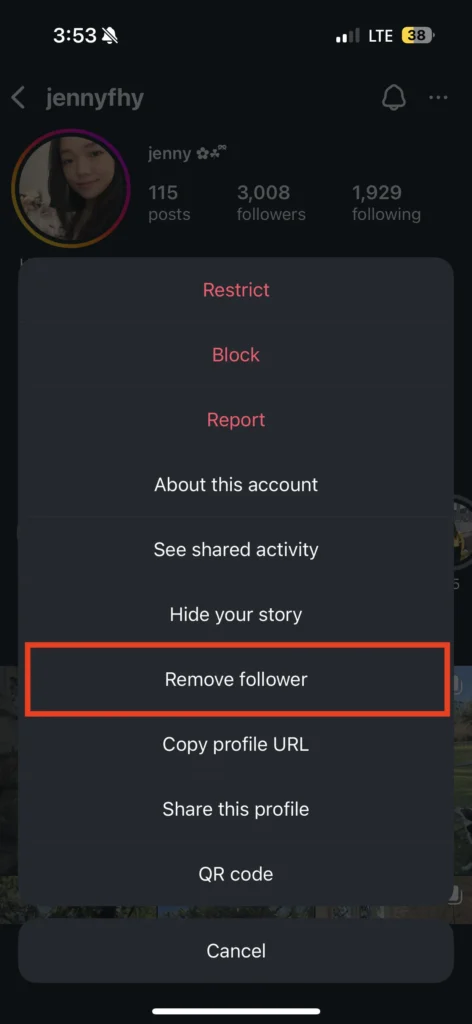
That’s everything you need to do! The person is no longer in your followers list.
What You Can Do Instead of Hiding Followers on Instagram
Some additional tools can help you maintain privacy. These include:
- Close Friends List: IG allows you to post and story content to a selected list of followers. You can curate your “Close Friends” list to ensure it includes everyone you need.
- Muting Followers: If a certain follower is annoying you but you don’t want to remove them, you can easily mute their profile to avoid their stories, posts, or both.
- Hide Story/Posts From: In addition to your close friends, you also have the option to simply hide content from certain followers. This allows you to post whatever you want, without having to worry about one or two followers.
- Third-Party Apps: There are also various apps that claim you can hide followers, but this option is not possible. Any claims that are completely impossible in-app are a scam. Make sure to avoid them at all costs.
Conclusion
To wrap it up, there is no direct response to how to hide followers on Instagram. This process is not supported by Instagram. However, all the possible workarounds are covered here. These include:
- Making your account private,
- Restrict followers,
- Block users,
- Remove followers.
FAQs
There is no way to directly hide followings from followers. You can only restrict users, block them, or turn your page private.
To hide followers from friends, you can easily restrict them. However, there is no way to hide followers from specific users.
Unfortunately, there’s no way to “only hide followers on Instagram” without a private account. Followers on IG are a public element and are impossible to hide without a private account.
If you can’t see someone’s followers, it usually comes down to privacy settings. On a private account, you must be an approved follower to view their follower and following lists. If you’re not approved, the lists will remain hidden.
Not entirely. Instagram doesn’t offer a direct “hide followers” feature. However, you can make your account private, which restricts your followers and following lists to only the people you approve.




![Read more about the article How to Clear Instagram Cache? [Full Guide in 2026]](https://socialmedia.ainfluencer.com/wp-content/uploads/2025/09/jpeg-optimizer_How-to-Clear-Instagram-Cache-300x182.jpg)