With how massive a platform like IG is, worrying about privacy and safety is very common. When it comes to privacy online, one of the biggest issues is how to know if someone screenshots your Instagram story. If you’ve also wondered which of your stories was screenshotted, and by whom, then this article is for you.
Knowing how to post on Instagram responsibly, from Stories to Reels, can ensure your safety and online growth. In this article, we’ll take a look at which actions trigger a notification from Instagram, if there really is a way to know when someone screenshots your stories, and if it’s possible to prevent it. Let’s jump in.
How to Know If Someone Screenshots Your Instagram Story
Unfortunately, there is no real way to know if someone has screenshotted your story. So you may be wondering, where does the idea come from? Well, our research shows that this hasn’t always been the case.
Back in 2018, IG rolled out a feature where if any users took a screenshot from your story, a camera shutter icon would appear next to their name. This has always been a feature on Snapchat, where being discreet is the platform’s main appeal.
What sets IG apart is that this platform is not about discretion at all. Instagram is all about being seen, noticed, and remembered. The overwhelmingly negative response from users caused the platform to take a step backwards and allow everyone to take screenshots as they desire.
Does Instagram Notify Users When You Screenshot a Story?
In short, no. Instagram does not notify users when screenshots are taken. Whether it’s a normal story or a “close friends” one, there are no Instagram screenshot story notifications. So when you’re posting or reposting a story with the idea that it’ll disappear in a day, remember that anyone can take a screenshot of it and keep it.
Does Instagram Notify Users When You Screenshot a Post?
Not at all. While Story screenshot notifications were a thing for a while, you’ve never been able to get a notification when someone screenshots your posts. However, most users don’t do this as posts are pretty permanent. The option to delete them always exists for the user, but there is no disappearing with Instagram posts.
Does Instagram Notify Users When You Screenshot a Profile?
This is also a no. You can screenshot profiles without any way for the owner to know. Instagram treats your profile page like a normal image; capturing it silently is allowed. There’s no profile-specific screenshot alert, just like with posts and Stories. Feel free to screenshot any profile for reference; the other person won’t get an alert or message about it.
If you’re just trying to share someone’s profile with friends, so they can also follow them or view a public post, then you can just share it directly through DMs. This is easier and significantly less suspicious.
Does Instagram Notify Users When You Screenshot Reels?
Reels (Instagram’s short-form videos) follow the same rule: no notification when you screenshot or screen-record them. As a static screenshot only grabs one frame of the video and not the full motion, it’s better to screen record instead.
Does Instagram Notify When You Screenshot a DM?
The answer to this one depends on your messaging mode. If you’re chatting in the normal Direct Messages, then screenshots will not ring any alarms.
However, if you take a screenshot of “Disappearing messages,” or otherwise known as vanish mode, then both sides will receive a notification that a screenshot has been taken. Since this feature is toggled on and off by swiping, make sure not to accidentally turn off vanish mode.
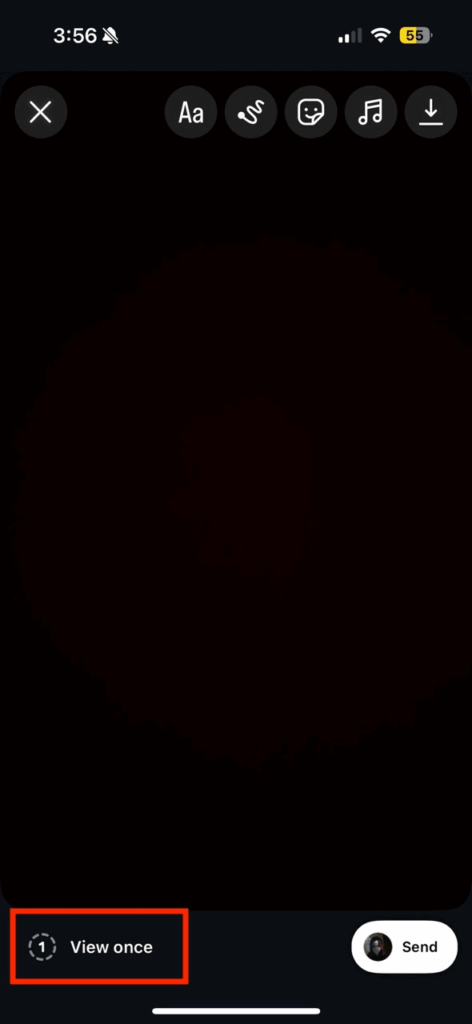
This is also true for “View once” media. When you take a photo or video to share in Instagram DMs, you have the option to send it in a “View once” format or allow for replays. If you choose to send it to only be viewed once, it will disappear after being sent. Instagram does let users know that a screenshot of “View once” media has been taken.
So with everything we’ve already gone through, you may be wondering if it is really possible to know if someone screenshots your story. The answer is a definitive no. While some tools and third-party websites will promise to deliver these services, our research shows that they are at best a prank and at worst a scam.
So remember that even if you delete your Instagram account, you cannot delete screenshots from other people’s galleries.
How Can You Prevent People from Taking Screenshots of Your Stories?
Since you can’t stop the screenshot event itself (nor know it happened), the practical approach is to control who can see your story in the first place. Instagram doesn’t offer a “disable screenshot” switch, but you can limit your audience. Here are some expert-recommended strategies:
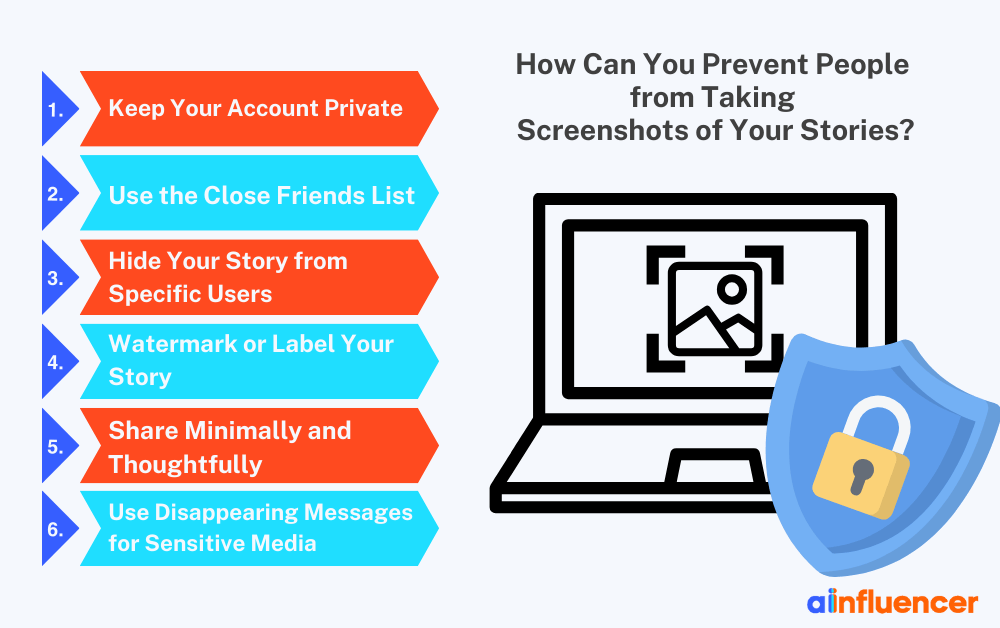
#1 Keep Your Account Private
If your account is private, only approved followers can view your Stories. This is the simplest way to reduce random screenshotters. Of course, private accounts aren’t ideal if you want public reach, but they guarantee that unknown people can’t see or screenshot your content.
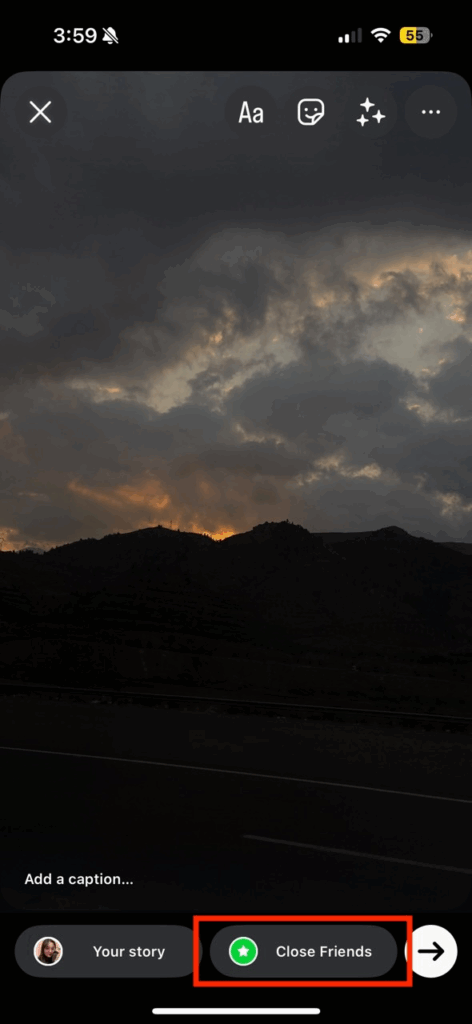
#2 Use the Close Friends List
For content you really want to protect, share it only with your Close Friends list. This way, even on a public profile, only a select group of people can view a given Story. While these users can still screenshot, at least they are people you trust.
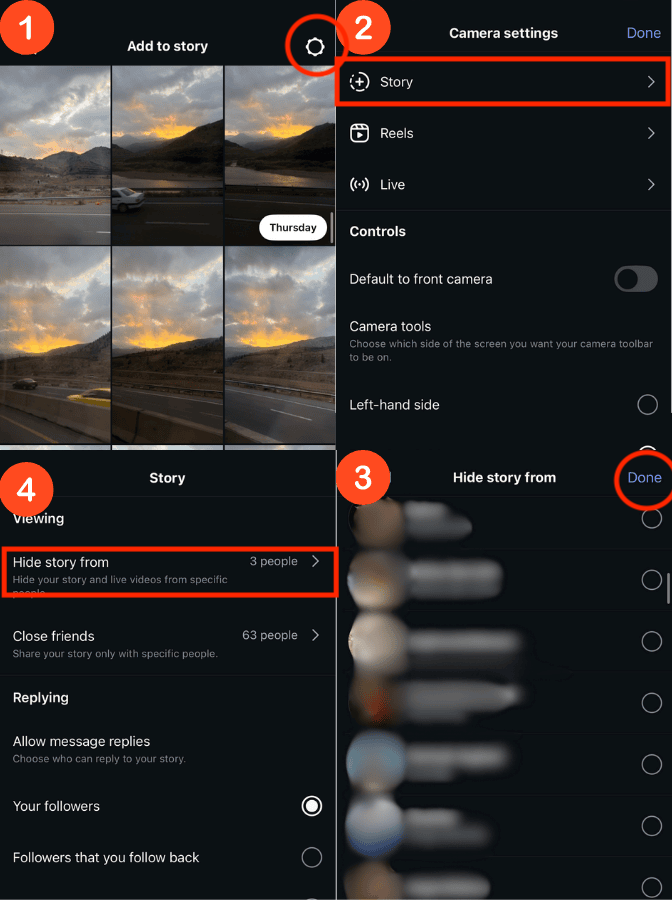
#3 Hide Your Story from Specific Users
Instagram allows you to block certain followers from seeing any Story. If there are individuals you suspect or don’t trust, you can exclude them. Go to Settings > Story > “Hide Story From” and add those accounts. They won’t see your Story at all.
#4 Watermark or Label Your Story
Before posting, add a visible watermark, logo, or text (e.g., your handle or “@friendName”) to your Story image. While this doesn’t technically prevent screenshots, it marks the image as yours. If someone shares it elsewhere, your watermark or username travels with it, which may discourage misuse.
#5 Share Minimally and Thoughtfully
Ultimately, assume anything you post can be saved or shared. Post only what you’re comfortable with being out in the world. Influencer Marketing Hub’s key takeaway is to “be cautious about sharing personal or sensitive information in Stories.” If it’s truly private, perhaps don’t share it at all.
#6 Use Disappearing Messages for Sensitive Media
If you have a very sensitive photo or video you want someone to see but not keep, use Instagram’s “View Once” feature in DMs instead of Stories. Instagram blocks screenshots of these media, so at least in that context, the risk is controlled.
No method is foolproof, but these practices help. For example, using Close Friends or a private account doesn’t stop a friend from screenshotting, but it stops strangers.
Hiding stories from certain followers ensures that particularly nosy people can’t view them at all. Even privacy experts agree: the best you can do is limit who sees your story. There is currently no feature to prevent screenshots outright.
Our experts dug through Instagram’s own privacy guidelines and community experts, which all emphasize controlling your audience. Instagram suggests: “If you’re concerned about who takes a screenshot of your stories, you can only share them with your close friends.”
This reflects the reality that privacy on Instagram is mostly about who views, not about screenshot alerts.
Also Read: What Does ‘Shared With You’ Mean on TikTok?
How to Screenshot Instagram Without Them Noticing
Since Instagram doesn’t notify Story screenshots by default, in most cases, you don’t need any special trick to be stealthy. If you screenshot a normal Story, post, profile, or Reel, the poster will never know. It’s also completely unethical to screenshot content that’s been specifically sent to disappear soon.
Conclusion
To wrap up, Instagram does not notify users when someone screenshots their Story. The question “how to know if someone screenshots your Instagram story” effectively has no answer; you simply cannot see this information through Instagram.
The only notifications the app will ever send are for disappearing DM content, not for Stories or regular posts. In other words, you can screenshot freely, and so can others, all in silence.
How to Know If Someone Screenshots Your Instagram Story: Frequently Asked Questions
1. Does Instagram Notify When You Screenshot a Story Highlight?
No. Highlights are just archived stories on your profile. Screenshotting a highlight works just like screenshotting a live story; no notification is sent. Additionally, new views won’t show up on the view list of these stories either. You can only find out if someone likes a Story highlight.
2. Are There Any Apps That Can Tell Me Who Screenshots My Instagram Story?
No. Be extremely wary of any app or service that claims to do this. Instagram’s security prevents third-party apps from accessing data about screenshots. Any such app is either outdated, fraudulent, or malicious.




![Read more about the article How to Clear Instagram Cache? [Full Guide in 2026]](https://socialmedia.ainfluencer.com/wp-content/uploads/2025/09/jpeg-optimizer_How-to-Clear-Instagram-Cache-300x182.jpg)