If you’ve ever found yourself struggling to get your images sized just right for Instagram, you’re not alone. Between blurry uploads, awkward crops, or those annoying black bars, posting high-quality content can feel harder than it should be. That is why you need a complete guide about Instagram post size.
The best part? Once you understand Instagram’s sizing rules, creating perfectly fitted posts becomes one of the easiest parts of sharing your content. Luckily, posting on Instagram has become simpler than ever. This means the platform takes care of part of the work for you.
In this guide, we’ll walk you through everything you need to know about Instagram width and height requirements. We’ll break down the different aspect ratios, show you which sizes work best for feed posts, Stories, Reels, and more. On top of that, we’ll share some of the best tools available to help you design and resize your images effortlessly.
So, stick with us until the end of this blog, and you’ll have every tip, trick, and tool you need to know about Instagram post size.
Instagram Image Size & Proportion Basics
To keep it short and simple, Instagram post sizes are all about pixel dimensions and the aspect ratio. The platform processes images in pixels, not inches or centimeters.
Instagram’s aspect ratios include 1:1 (square), 4:5 (portrait/vertical), 1.91:1 (landscape/wide), and of course 9:16 for full-screen Stories or Reels. Choosing the right pixel dimensions and ratio displays your images without unwanted cropping or black bars.
So, what is the new Instagram post size? Here is a more complete breakdown.
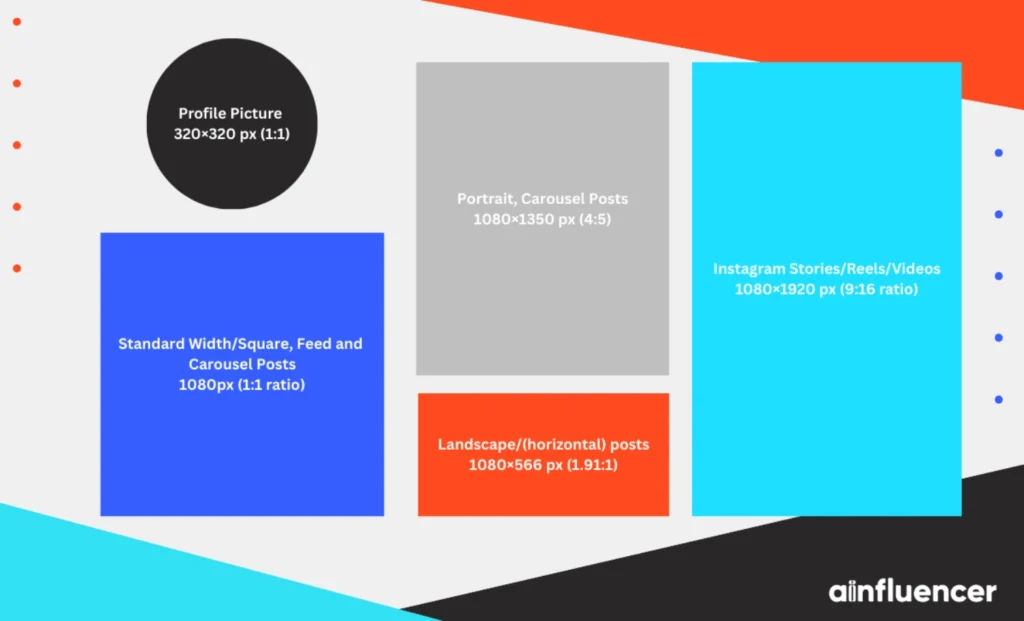
- Standard Width (1080px): Instagram’s magic number is 1080 pixels wide. Uploading images at or near 1080px width delivers the best clarity, and any image wider than 1080px will be downscaled by Instagram, which can blur details. On the other hand, images smaller than 320px in width will be stretched (and become pixelated). Just make sure to save your images at 1080px width in the proper ratio for the best quality.
- Aspect Ratios: Instagram’s default square posts use a 1:1 aspect ratio (1080×1080 px), but the platform also supports portrait posts up to 4:5 (1080×1350 px) and landscape posts up to 1.91:1 (1080×566 px). For Stories and Reels, which are full vertical, the native aspect ratio is 9:16 (1080×1920 px). Using anything outside these supported ratios won’t fit properly and may get cropped.
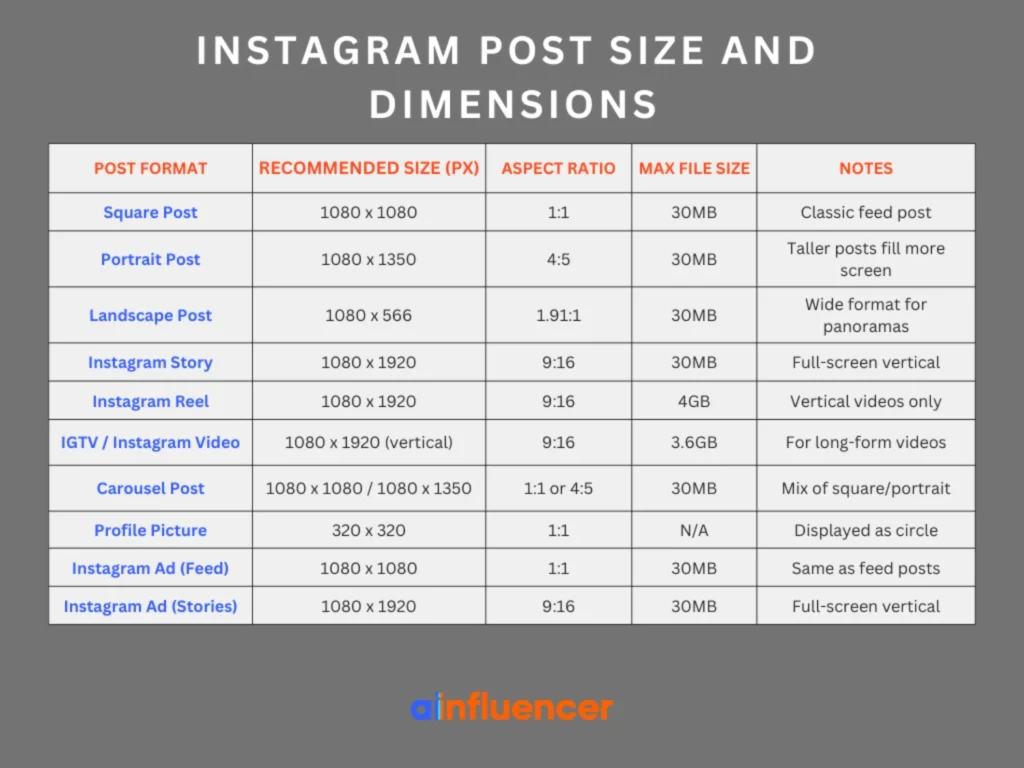
The table below summarizes the optimal Instagram post size and dimensions for each format (pixel values and aspect ratio). Understanding the basic sizes of Instagram will prevent the most common issues. In the next part, we’ll break down each format in more detail.
Instagram Feed Post Sizes
As we previously mentioned, Instagram feed posts can be square, vertical, or horizontal. On top of that, there is a classic popular format for Instagram post sizes that fully displays everything. That format is the square post, which uses 1080×1080 px (aspect ratio 1:1) and displays everything fully. Be sure to always start with 1080 px for the sharpest result.
- Portrait (vertical): For vertical posts, Instagram now supports both 1080×1350 px (4:5) and 1080×1440 px (3:4). Using the taller formats helps your posts take up more space in the feed, which can increase visibility and engagement. Instagram has also been rolling out a taller profile grid, so vertical posts may appear larger in your profile preview. To make sure your images display correctly, export them at 1080 px wide in either 4:5 or 3:4 format.
- Landscape (horizontal) posts: For these types of content, Instagram uses 1080×566 px (1.91:1). This wide aspect is ideal for panoramic or group shots. If you upload a wider image (like 1080×608 or 1200×600), Instagram will crop it to 1080×566 in the feed. So the safest size is 1080×566.
- Carousel posts (multiple images in one post): Just like the other sizes, carousels follow the same rules. All slides in a carousel must share the same ratio; you can’t mix square and portrait images in one carousel. So always make sure to choose one format per carousel.
Following these Instagram post sizes prevents your content from being unintentionally cropped. Here is an example: if you upload a 4:3 photo (1200×900) without resizing, Instagram will crop it. It’s always best to resize images yourself so that the final upload matches one of the supported sizes. To gain more followers on Instagram, make sure your content is optimized and consistently fits these guidelines.
Instagram Profile, Story & Reels Sizes
Since you’re not just posting to your Instagram feed, it’s important to understand all the details about Stories, Reels, and your profile. Knowing the correct Instagram post sizes ensures your content looks its best. You can also repost a story on Instagram to keep your content fresh and engaging.
Beyond feed posts, let’s look at the right sizes for your profile, stories, and reels so every part of your account stays sharp and professional.
- Instagram profile photo size: Instagram displays your profile picture as a circle, but it’s stored as a square. The ideal upload size is 320×320 px (1:1), which keeps your image crisp even though it typically appears around 110 px in diameter on mobile devices. Stay focused to center the main subject, as the corners will be cropped by the circular frame.
- Instagram story size: Instagram Story size (and Story Ads) should be 1080×1920 px (9:16 ratio), which is full-screen vertical. Anything wider or shorter will result in black borders or cropping. Always design Story content at 1080×1920 to fill the screen.
- Instagram Reels size: Reels, IGTV, and Live replays also use 1080×1920 px (9:16). As vertical videos, Reels should be exported at 1080×1920 for full-screen display. The cover image you choose for your Reel should also be 1080×1920 (or at least a vertical image) to avoid awkward cropping in the profile grid. When planning your content, consider both the Instagram Reel length and the visual composition to maximize engagement.
- Story & Reel Compatibility: Both Stories and Reels let you upload images between 1.91:1 and 9:16, but any image that isn’t 9:16 will either crop or get borders. To ensure no border, stick to 1080×1920 (9:16) for both.
- Instagram Live: Instagram Live videos can run for up to 4 hours per session, and live streams are saved as vertical 1080×1920 px (9:16) replays. Unlike earlier assumptions, there is no 60-second limit on saved Live replays. Viewers can watch the full session unless it’s deleted, expires, or the user chooses to delete their Instagram account.
Instagram Ads and Sponsored Post Sizes
Instagram ads usually follow the same image sizes we’ve already mentioned. However, as we all know, there are exceptions. Ads aren’t always the same as images, especially sponsored posts; they’re often square or the same size as the regular posts.
Story ads, on the other hand, should follow the 1080×1920 format (9:16). If you run Instagram ads through Facebook, the recommended sizes are the same as the images mentioned.
With Instagram’s new grid layout, posts appear as taller previews. The recommended size for grid photos is now 1080×1350 (4:5). While your feed uploads should be 1080×1350 or smaller, Instagram will show them in the grid at full height.
Remember to always save or prepare images at 1080 px wide with the right ratio. Instagram will make larger files smaller, but won’t make smaller files bigger. For vector graphics or screenshots, increase the size to 1080px before posting to avoid blurriness.
Best Resizing Tools for Instagram Posts
Resizing images to fit Instagram’s requirements doesn’t have to be a headache. Here are some top tools and apps that make it easy:
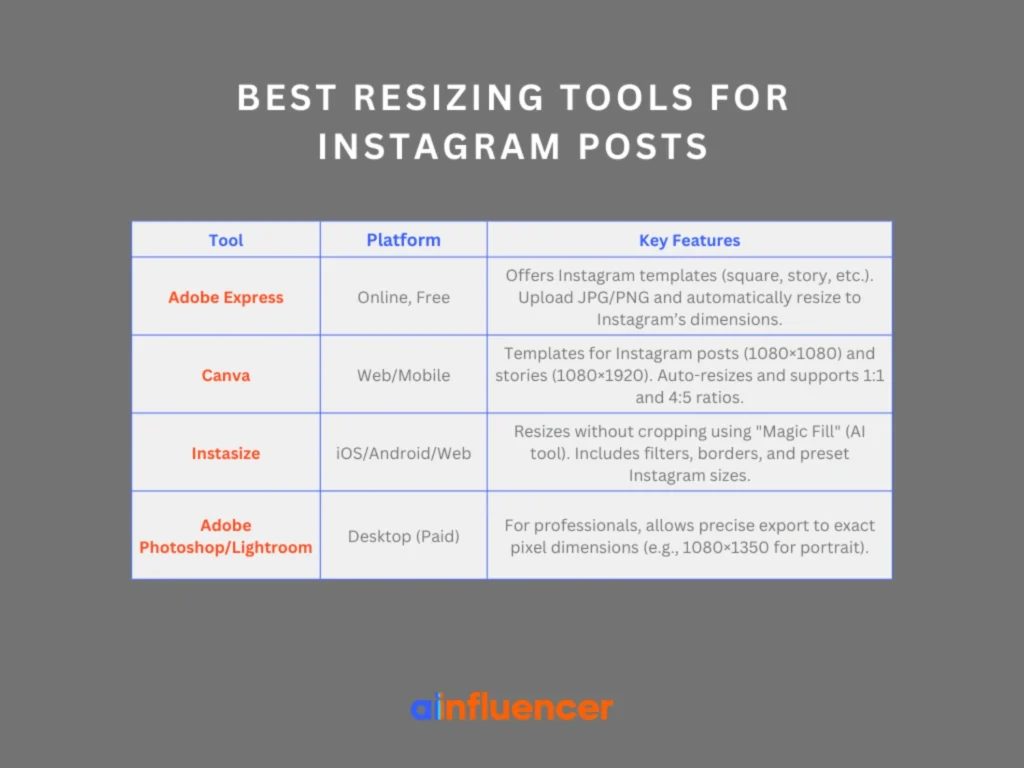
- Adobe Express (Online, free): Adobe’s free Image Resizer has templates for Instagram (square post, story, etc.). Simply upload your JPG/PNG and select the Instagram format. It instantly outputs an image at the recommended dimensions.
- Canva (Web/Mobile): Canva also has templates labeled “Instagram Post (1080×1080)” and “Instagram Story (1080×1920)”. You can drag in your photo, and it automatically fits the canvas. Canva supports 1:1 and 4:5 ratios, and you can even resize a design to multiple Instagram formats within seconds.
- Instasize (iOS/Android/Web): Instasize is a popular Instagram post size app specifically for social media photos. It can resize images without cropping by using a “Magic Fill” too,l which is an AI feature that extends backgrounds to fit the desired aspect ratio. Instasize also has filters, borders, and preset Instagram post size dimensions.
- Adobe Photoshop / Lightroom: For professionals, Photoshop or Lightroom can export images at the exact pixel dimensions. Just set the export size (e.g. 1080×1350 for a portrait) and save. Lightroom’s Export dialog lets you set pixel dimensions and quality.
These tools help you hit the exact Instagram post size you want. It’s better to adjust images ahead of time than to rely on Instagram’s automatic cropping, which can ruin designs.
Recent Changes & New Instagram Size Guidelines
What is the new size of an Instagram post? Instagram has recently updated how images appear on profiles and feeds. Brands need to adapt:
- New 4:5 Grid Preview (2024–2025): Instagram post sizes now have a taller profile grid, switching from 1:1 square thumbnails to 4:5 vertical ones. This change is to better fit vertical content, which is common on smartphones. If you used square images for designs like checkerboards, your grid may look different now. Use images sized at 1080×1350 px. Keep important things (like text or logos) in the middle 1080×1080 px area to avoid them getting cut off.
- Consistent Sizing: Many experts suggest uploading all images as 1080×1350 (4:5) because Instagram will show them fully on updated accounts and still works on older ones. Just make sure your content (text or images) is in the center square of the image. That way, if an account hasn’t switched to the new layout, it will crop the extra height, but if it has, the full 4:5 post will show.
- Grid-only Posts: Instagram’s algorithm is now testing “grid posts” images that only show on your profile grid, not in followers’ feeds. This lets creators keep a visual theme (like puzzle-style images) without flooding the feed. These posts still follow the usual size rules and often appear as 4:5 grid thumbnails if the update is available.
- Live & Reels Emphasis: Instagram now prioritizes Reels and live video content. When creating Reels, remember they use 1080×1920 as noted above. Additionally, Instagram will often pick a cover photo (again 1080×1920) to display on your profile grid. Choose these carefully to maintain aesthetics.
Conclusion
You now have all the important info about Instagram post sizes, no matter if it’s for feed posts, Stories, or Reels. By following the recommended dimensions, you can ensure your images and videos look perfect without getting cropped or distorted. Just use the right sizes we’ve outlined, and your content will always display the way you want it to, no matter where it’s shown.
FAQs
If you upload the wrong image size, Instagram might crop it, make it blurry, or add black borders. Instagram can shrink bigger images, but it won’t make smaller images bigger, which can make them look pixelated. Always use the correct size to keep your images sharp and clear.
No, different types of posts need different sizes. Square posts are 1080×1080 px, vertical posts are 1080×1350 px, and landscape posts are 1080×566 px. For Stories and Reels, the size is 1080×1920 px. Make sure you use the right size for each type to avoid cropping or borders.
Instagram’s grid now shows taller images (4:5). To make sure your image looks right, upload it at 1080×1350 px. Keep important parts, like text or logos, in the middle 1080×1080 px area so they won’t get cropped.



![Read more about the article How to Clear Instagram Cache? [Full Guide in 2026]](https://socialmedia.ainfluencer.com/wp-content/uploads/2025/09/jpeg-optimizer_How-to-Clear-Instagram-Cache-300x182.jpg)