
How exactly can you repost a story on Instagram? Is it really possible? That’s what we’ll tell you in this comprehensive guide. We’ll explain how to repost a story on Instagram with some additional tips.
Reposting someone else’s story with their permission is a great way to share exciting moments without always having to create new content. That is why learning how to repost a story is just as important as learning how to post on Instagram the right way. It helps you create partnership opportunities while keeping your content fresh and engaging.
In this guide, we’ll teach you how to repost a story on Instagram, along with everything you need to know about sharing stories you are tagged in and even those you are not. We’ll also share reasons why reposting can be valuable.
So, stick around. We’ve got all the answers you need.
Why Repost Instagram Stories?
Before answering how to repost a story on Instagram, it’s important to understand why people do it.
According to Sendible, reposting someone else’s story isn’t just about recycling content; it’s a smart way to increase engagement by 28%, especially for public accounts and brands.
When you share your friend’s or a follower’s story, you’re sharing an original user-generated content (UGC) that feels real and familiar to your audience.
This strategy can also help you get more Instagram followers by showing engaging content that attracts new viewers to your profile.
Here are the main benefits of learning how to repost a story on Instagram:
- Fresh Content & Variety: Reposting an interesting story gives your audience something new beyond your own content. It brings fresh perspectives without you having to create everything from the ground.
- Increased Reach: Sharing Stories from relevant accounts can introduce your brand to new audiences. Their followers may find you interesting through the repost and start to follow you.
- Community & Trust: When you reshare content that features your brand, you are, in fact, building credibility. It shows how much you value your community, which encourages more people to engage and tag you.
- Time-Saving: Constantly creating content can be such a pain in the neck. By resharing high-quality Stories from others, you can keep your page active while giving yourself time to think of better content.
To keep it short and clean, reposting stories on Instagram helps you keep your content calendar full. That’s why knowing how to do it should be a top priority for creators and brands alike.
How to Repost a Story on Instagram That You’re Tagged?
Learning how to repost a story on Instagram becomes easier than ever when you are being mentioned. When someone tags you in their Instagram story, Instagram automatically sends you a DM notification saying someone mentioned you in their story.
Let us teach you how to repost a story on Instagram that you’re tagged:
- Open Instagram and go to your “Direct Messages”.
- Look for the message about the mention (it usually appears at the top).
- Tap the message to open the “Story”.
- Tap “Add to Your Story.” This opens the story editor. The story will appear on a canvas where you can customize it.
- Customize and share by adding text, stickers, GIFs, or other creative elements to make it your own. When ready,
- Tap “Your Story” to post it.
This repost will include the original creator’s username and profile picture automatically, giving them credit. Keep in mind that you can only repost tagged Stories while they’re still live (within 24 hours).
Also, the original account must be public and have resharing enabled. If these conditions are met, reposting a tagged Story is as simple as tapping “Add to Your Story.”
How to Repost a Story on Instagram that You’re Not Tagged?
Sometimes you come across a great story that you’d love to share, but you’re not tagged in it. Since Instagram doesn’t provide a direct “repost” option in this case, you’ll need to use a detour.
This is how to repost a story on Instagram that you’re not tagged in:
- Ask the person to tag you: The easiest way is to message the original poster and request that they tag you in their story. Once they do, you’ll get the option to share it directly to your own story.
- Take a screenshot or screen recording: For photos, take a screenshot; for videos, use your phone’s screen-recording feature. Then, upload that file to your story. Always give proper credit by tagging or mentioning the original creator. Remember that reposting without permission can harm trust, so it’s best to get consent from the original creator before sharing. You can also check how to know if someone screenshots your Instagram story to stay informed about your content’s privacy.
- Use the DM “share” feature: While this doesn’t share your public story, you can tap the paper airplane icon on the story and send it to friends or groups in “Direct Messages”. It’s useful for private sharing.
- Third-party reposting apps: There are apps like Repost It (iOS) or Story Reposter (Android) designed to help reshare Stories. Typically, you copy the story’s link (by tapping the three dots and “Copy Link”) and then open the app to repost. Keep in mind, only use reputable apps and never share your Instagram password. These apps aren’t officially supported by Instagram.
In all these cases, remember that Instagram’s community guidelines require you to have permission to share someone else’s content. Respecting creators’ rights and giving credit keeps reposting ethical and effective.
How to Repost a Post to Your Story on Instagram?
Instagram not only lets you share other people’s stories, but you can also repost any public post (photo or video) to your own story. Here’s how:
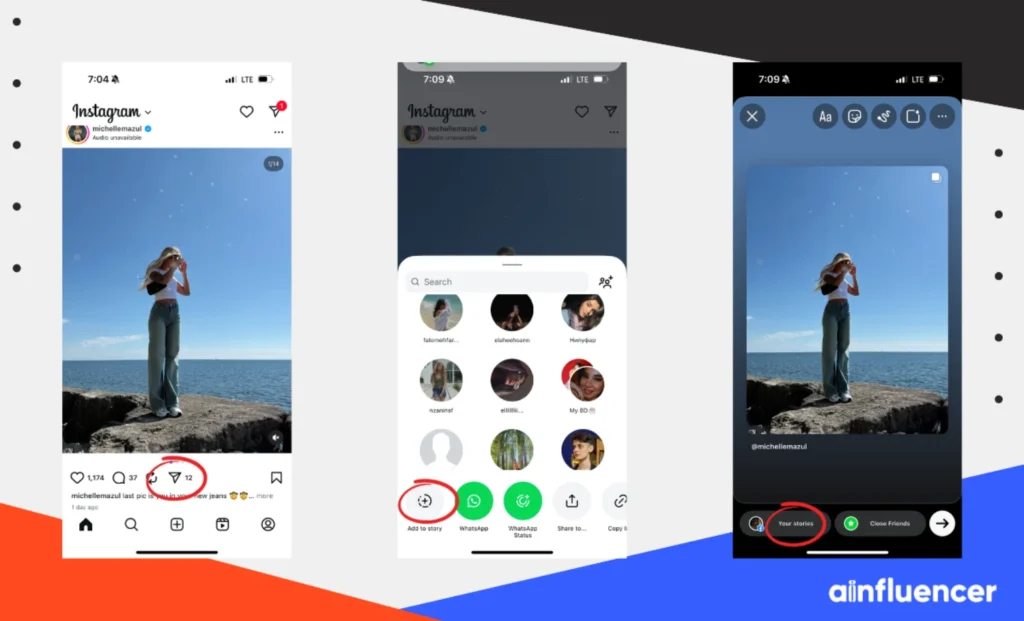
1. Find the post you want to share (it must be from a public account).
2. Tap the paper airplane “Share” icon below the post.
3. Select “Add Post to Your Story.” This opens the story editor with the post displayed.
4. Edit your story. You can add text, GIFs, stickers, or anything else to personalize it.
5. Tap “Your Story” to post it.
This method automatically shows the original creator’s username on the story. It is considered a simple way to share a photo or video you like while giving credit. However, keep in mind that if the original poster has a private account, the “Add Post to Your Story” option won’t show.
How to Repost a Reel on Instagram Story?
Reposting will add a preview of the Reel to your story, and followers who see it can tap to watch the full Reel. The process is almost identical to sharing a regular post:
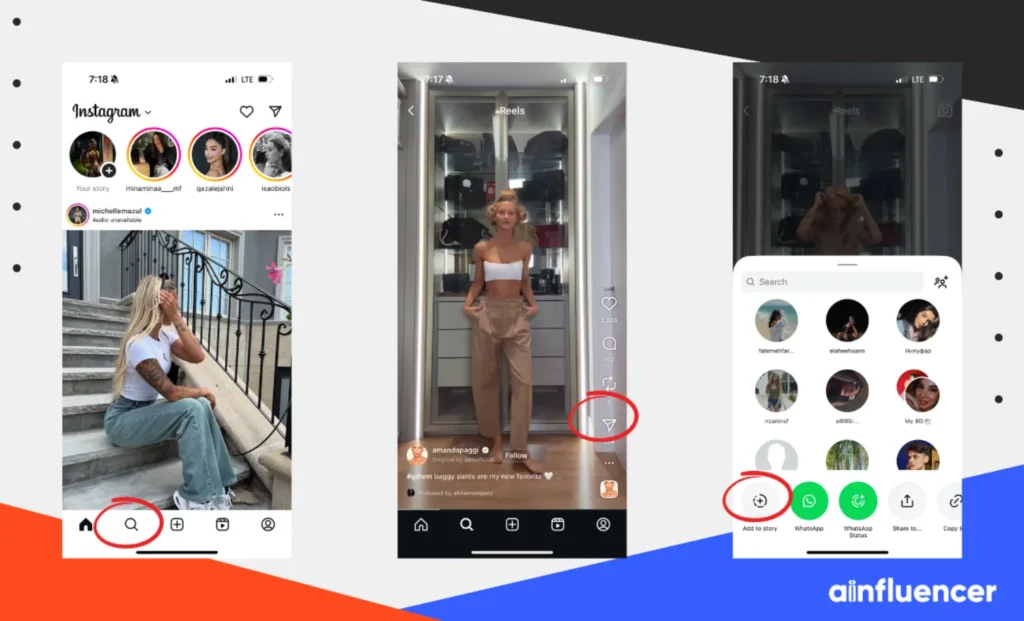
1. Open the Reel you want to share (again, it must be from a public profile).
2. Tap the paper airplane icon below the Reel.
3. Choose “Add Reel to Your Story.” This launches the story editor with the Reel preview.
4. Customize your story. You can add captions, stickers, or other creative elements to give context or your reaction.
5. Tap “Your Story” to share it.
How to Repost a Comment on an Instagram Story?
Unfortunately, there isn’t a direct way to repost a comment like a story, but using screenshots is the most common way! The steps are:
- Screenshot the comment you want to share (from a post, story, or a reel).
- Create a new Story by swiping right on Instagram.
- Upload the screenshot and adjust it to fit your Story.
- Tag the commenter by typing their username or using the “mention” sticker.
- Post it to your Story for your followers to see!
When to Repost a Story or Share a Feed Post?
What you choose to repost and when you repost it are two of the most important points to keep in mind. Here are the best times to reshare someone else’s story:
- Influencer or Partner Posts: Always share stories from collaborators or influencers you work with. This highlights your partnerships and helps both sides gain new followers.
- Relevant Brand Content: If another brand or creator shares content that aligns with your values or message, reposting it can create good industry relationships.
- Promote Your Own Feed Posts: Many users check stories before scrolling their feed. By sharing your own posts to your story, you give them extra visibility, driving more views, likes, and comments. For tips on creating the best visuals, check out the Instagram story size.
- User-Generated Content (UGC): If a customer or fan posts about your product or service, repost it to show your appreciation. Just double-check you ask for their permission first.
- Events and Highlights: Share live updates, announcements, or event highlights from others if they add value to your audience. This helps keep your stories fresh and timely.
Tips for Getting More Followers by Reposting Stories
According to Instagram’s algorithm, reposting Stories isn’t just about saving time; it can actually help you grow your Instagram following if you do it the right way. Here are some simple tips to follow:
- Credit the Original Creator: Always tag or mention the person who made the content. This is polite, and it can also encourage them to share your repost with their followers.
- Ask for Permission: If you want to repost someone’s content, especially if they didn’t tag you, send them a quick DM asking, “Can I share this on my story?” Most people like being asked and may even share your repost to thank you.
- Add Your Own Touch: Don’t just repost without changes. Add your own caption, sticker, or question to make it feel more personal. For example, if you repost a product photo, you could add a poll asking, “Have you tried this?”
- Keep the Quality High: Blurry or low-quality posts can turn people away. If your repost doesn’t look good (like when screen recording), ask the creator for the original file. Clear, high-quality reposts always look more professional.
- Post at the Right Time: Share your reposts when your followers are most active. Check Instagram Insights to see when your audience is online to get the best reach.
- Mix With Your Own Content: Don’t only share reposts. Combine them with your own photos, videos, or announcements to keep your story interesting and balanced.
- Save to Highlights: If you’re reposting a set of related Stories (like reviews or event clips), save them to a Highlight so followers can view them anytime, even after the 24-hour limit.
- Engage After Posting: When you repost someone, they might comment or DM you. Reply to them to build stronger connections and show you value their content.
- Grow Your Reach: Reposting content from influencers, brands, or popular accounts in your niche can expose you to their audience. Tagging them increases the chance they’ll notice you and share your content.
Conclusion
Learning how to repost a story on Instagram can be a great way to reach a new audience and boost engagement. Reposting a story you’re tagged in or finding ways to share one you’re not tagged in is simple and easy. All you have to do is know the steps and stick to them, just like we mentioned. Just make sure to always get permission before making any moves.
FAQs
Reposting gives you the chance to share fun content without making it all yourself. By crediting and tagging others, you might get featured or reach their followers. Reposts with interaction also do well in Instagram’s algorithm. In short, good reposts can boost your visibility and attract new followers.
For Instagram story sizes, use a 9:16 aspect ratio with a size of 1080×1920 pixels. For feed posts, Instagram recommends 1080×1080 (square) or 1080×1350 (portrait) for the best quality. Always aim for at least 1080px width.
Yes, if you have their permission and give credit. Reposting can help both you and the original creator when done respectfully. Always follow Instagram’s rules and only repost content you have permission to share, and credit the creator. Reposting can also encourage others to tag you in their future posts.





![Read more about the article How Long Can Instagram Reels Be? [A Complete 2026 Guide]](https://socialmedia.ainfluencer.com/wp-content/uploads/2025/09/How-long-can-instagram-reels-be-1-300x182.jpg)
![Read more about the article How to Clear Instagram Cache? [Full Guide in 2026]](https://socialmedia.ainfluencer.com/wp-content/uploads/2025/09/jpeg-optimizer_How-to-Clear-Instagram-Cache-300x182.jpg)