How to pause Instagram Reels when you want to get a better look at something? Maybe you missed a quick tip, a lyric went by too fast, or you want to freeze your crush’s dance move. 😃So, pausing a fast-moving Reel can be crucial.
Learning this is just as essential as the basics, like how to post on Instagram. In this guide, we’ll provide a complete guide on how to pause a reel in Instagram on both phone and computer, and what to do if pausing doesn’t seem to work. Let’s get started!
How to Pause Instagram Reels on iPhone & Android?
Pausing a Reel on your phone is very easy once you know the trick: just a quick tap on the video, or tap-and-hold. Just like knowing the best Instagram post size, mastering pausing Reels gives you more control over your content and viewing experience.
Here’s how to pause Reels on Instagram:
Method 1: a Quick Tap on the Video
you can stop it anytime with just a quick tap on the screen. You just need to tap anywhere on the video quickly, The Reels will freeze and you might see a small play icon (▶️) confirming it’s paused.

Resuming the Reel is just as easy. You tap the video again, and it will start playing from where it paused. The small play icon (▶️) will disappear, and you’re back to watching as usual.
Method 2: Press & Hold
- Open a Reel: Find a Reel in the Reels tab, Explore page, or someone’s profile.
- Play it: Let the Reel start.
- Tap and hold: Press anywhere on the video and keep your finger down.
As you can see, when you press and hold on the Reel, it will pause, and any on-screen information, like the user profile, captions, and other details, will disappear while your finger stays on the screen.

To resume the Reel, you just need to lift your finger to continue playing. It’s the same for both iPhone and Android devices.
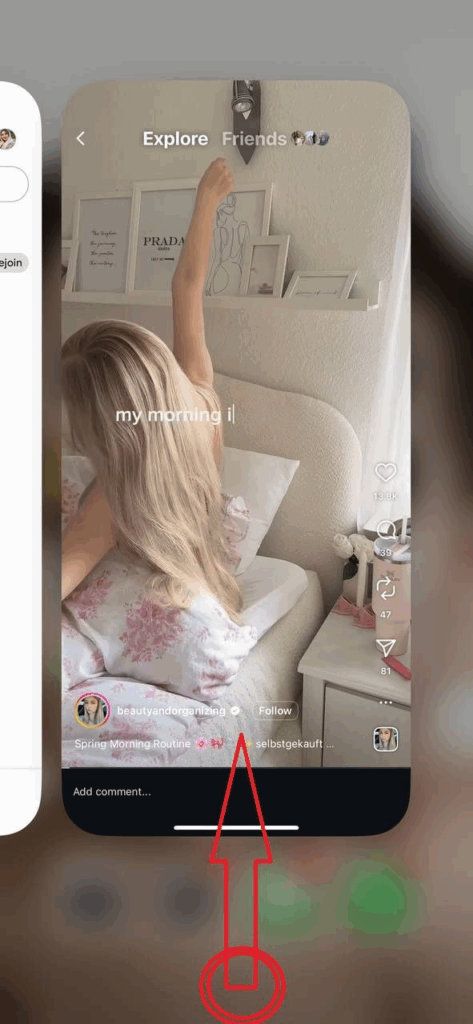
Method 3: Swipe Up
Here’s the next trick to pause a Reel on Instagram:
- Swipe up to pause: Hold your finger on the bottom of the screen to pause, then slide up to open the app switcher. The Reel stays paused even after you lift your finger. (For Android, you should hit the recent apps button)
When you go back to the Instagram app, the Reel will start playing automatically.
How to Pause Instagram Reels on a Computer?
Pausing Reels on Instagram’s website is super easy. Here’s how:
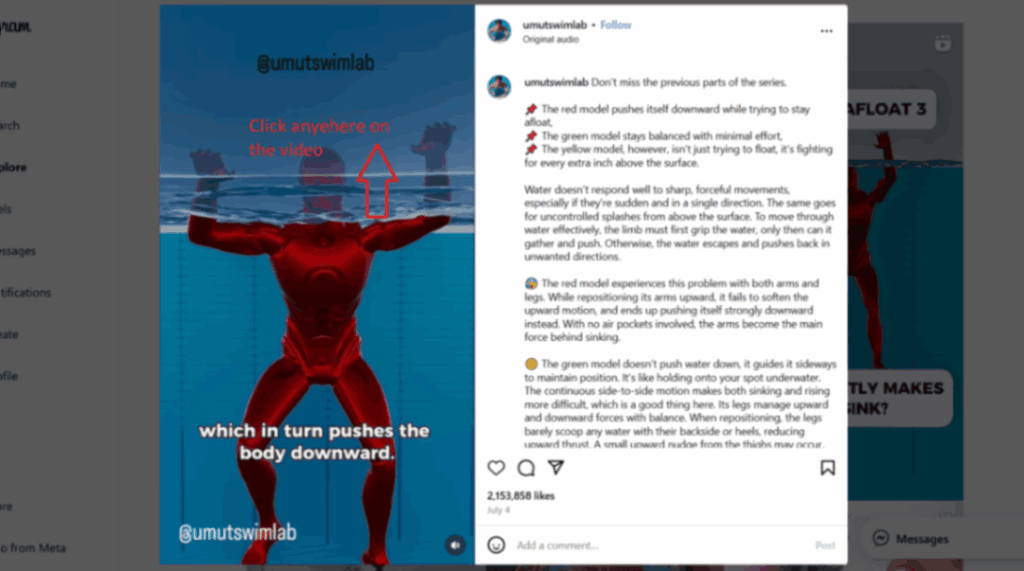
- Find a Reel: Click on any Reel from the Reels tab or someone’s profile.
- Pause: Just click anywhere on the video.
- Resume: Click again or press the play icon to keep watching.
Alternative Ways to Pause Instagram Reels (Without Holding)
If you don’t want to use the standard hold gesture, here are some other easy methods:
1. Screen Recording: Record the Reel with your phone’s screen recorder. Then pause, rewind, or screenshot anytime. Music can be recorded, too.
2. iPhone Shortcuts: Use Back Tap, Voice Control, or AssistiveTouch to start/stop screen recording or simulate a long press.
3. Third-Party Apps: Some verified apps let you save Reels to your phone. Once saved, pause it like any normal video.
4. Download on Desktop: Download your own or royalty-free Reels, then play them in any video player for normal pause controls.
5. Extra Accessibility Tricks: You can use apps like “Tap Auto Clicker” to simulate a long press. These are optional but useful if you want to pause without physically tapping.
Why Pausing Instagram Reels Matters?
Instagram Reels auto-play to keep viewers scrolling quickly, but sometimes you want to stop and take a closer look. Pausing lets you catch details you might miss, like noting “200g flour” in a cooking reel or counting reps in a fast-paced exercise video. Without pausing, you might have to rewatch or skip ahead, which can be frustrating.
Pausing isn’t only helpful for viewers, but it also boosts engagement. Higher engagement can help you get more followers on Instagram, which is a small step toward your account’s growth. When someone pauses a Reel, Instagram sees it as high interest.
More pauses mean longer watch time, signaling the algorithm that the content is worth showing to more people. This makes pausing a silent vote of “this content is good.”
Creators often design Reels with pausing in mind. Hidden jokes, Easter eggs, or quick instructions rely on viewers stopping the video. Pro move! 😀 Some campaigns even encourage pausing to reveal discounts or tips, which increases interaction and retention.
Besides, paused frames are often screenshotted or shared, giving content extra visibility and social proof.
For content creators, knowing how to pause Reels is also important for learning. It helps analyze competitors, study visual techniques, and gather inspiration.
Troubleshooting Pause Issues: Why Can’t I Pause Reels on Instagram?
Most of the time, a single tap on the video or holding your finger on a Reel should pause it. But if it’s not working, here are the most common issues and what you can do:
1. App Needs Update or Restart: An outdated version of Instagram can break features like the pause gesture.
2. Auto-Advance Reels: Some Reels, like certain ads or special formats, are designed to auto-play from start to finish. In these cases, the hold gesture won’t work at all.
3. Instagram Live Videos: Lives can’t be paused since they stream in real time. That’s why you might see people asking, “Why can’t I pause Instagram Live?” Because the feature doesn’t exist.
4. Touchscreen or Device Issues: Sometimes the problem isn’t Instagram but your phone’s screen. If your screen protector is too thick, or if your phone has touch sensitivity issues, long-presses may not register properly. To test, see if long-press works in another video app. If not, try removing your screen protector, cleaning your screen, or adjusting sensitivity settings.
5. Clear Instagram’s Cache: If videos keep acting buggy, clearing Instagram cache often helps. On Android, go to Settings > Apps > Instagram > Storage > Clear Cache. On iOS, the only option is deleting and reinstalling the app.
6. Internet or Performance Problems: Sometimes a slow internet connection makes Reels stutter instead of pausing smoothly.
In most cases, a quick update or reinstall solves pause problems. But if pausing is disabled for that specific Reel (like with ads or Lives), workarounds like screen recording are your best option.
Wrapping Things Up
Learning how to pause a video on Instagram Reels isn’t just a trick; it’s handy for getting small details and saving funny moments. In this guide, we’ve covered the steps to do it whether you’re watching on your phone or computer. Moreover, there are plenty of workarounds if the normal hold-to-pause doesn’t work.
So next time something flashes by too quickly, don’t worry! You’ve got all the tools you need to hit pause and enjoy the moment.
FAQs
1. How to Mute Instagram Reels Instead of Pause?
When you want to mute a Reel, tap the screen. The video will freeze, and above the play icon (▶️), you’ll see the speaker icon (🔊), which you can tap to mute the audio. All Reels will stay muted until you exit the app or tap the icon again to unmute.
2. How to Pause Instagram Reels by Tapping?
Instagram actually lets you pause a Reel with a quick single tap. Just tap anywhere on the video, and it will freeze, showing a small play icon (▶️) to confirm it’s paused. To resume, simply tap the video again.
3. How to Get Pause Button on Instagram Reels?
Instagram doesn’t have a dedicated pause/play button yet, but you can pause a Reel with a single tap, the small play icon (▶️) will appear. You can also use the press-and-hold method on mobile or click on desktop. Meta is testing an official pause button, so soon stopping and playing Reels will be even easier!
4. How to Pause Instagram Reels Frame by Frame?
Instagram itself doesn’t have a frame-by-frame option. If you want that level of control, the trick is to screen-record or download the Reel, then open it in your gallery or a video editor. From there, you can slide through the video slowly and stop on the exact frame you want.
5. Can I Pause Instagram Reels Without Holding Down on the Screen?
Inside the app, the only built-in method is holding your finger down. But you can use a single tap on the video or try little workarounds, like screen-recording the Reel and pausing the recording, or using accessibility features like AssistiveTouch (iPhone) or the Accessibility Menu (Android).


![Read more about the article How Long Can Instagram Reels Be? [A Complete 2026 Guide]](https://socialmedia.ainfluencer.com/wp-content/uploads/2025/09/How-long-can-instagram-reels-be-1-300x182.jpg)